Directory
Keep track of the people and companies on a project.
Part of Project Management.
Found in each project and your organisation. What's the difference?
Guests see everyone on a project but add nobody; members with the permission manage your organisation's.
Directory lists the people and companies on a project, with each person's organisation, job title and permission template. Your organisation also has a directory of its own members.
The project directory has three tabs: People, Organisations and Distribution Groups. People who can add people to the project also see Invitations.

People is a register of everyone on the project, from every organisation. Its columns are:
- Name, with the person's email address beneath;
- Job Title;
- Organisation;
- Discipline: the organisation's discipline;
- Permission Template;
- Joined: when the person joined the project;
- Induction: their induction status on this project.
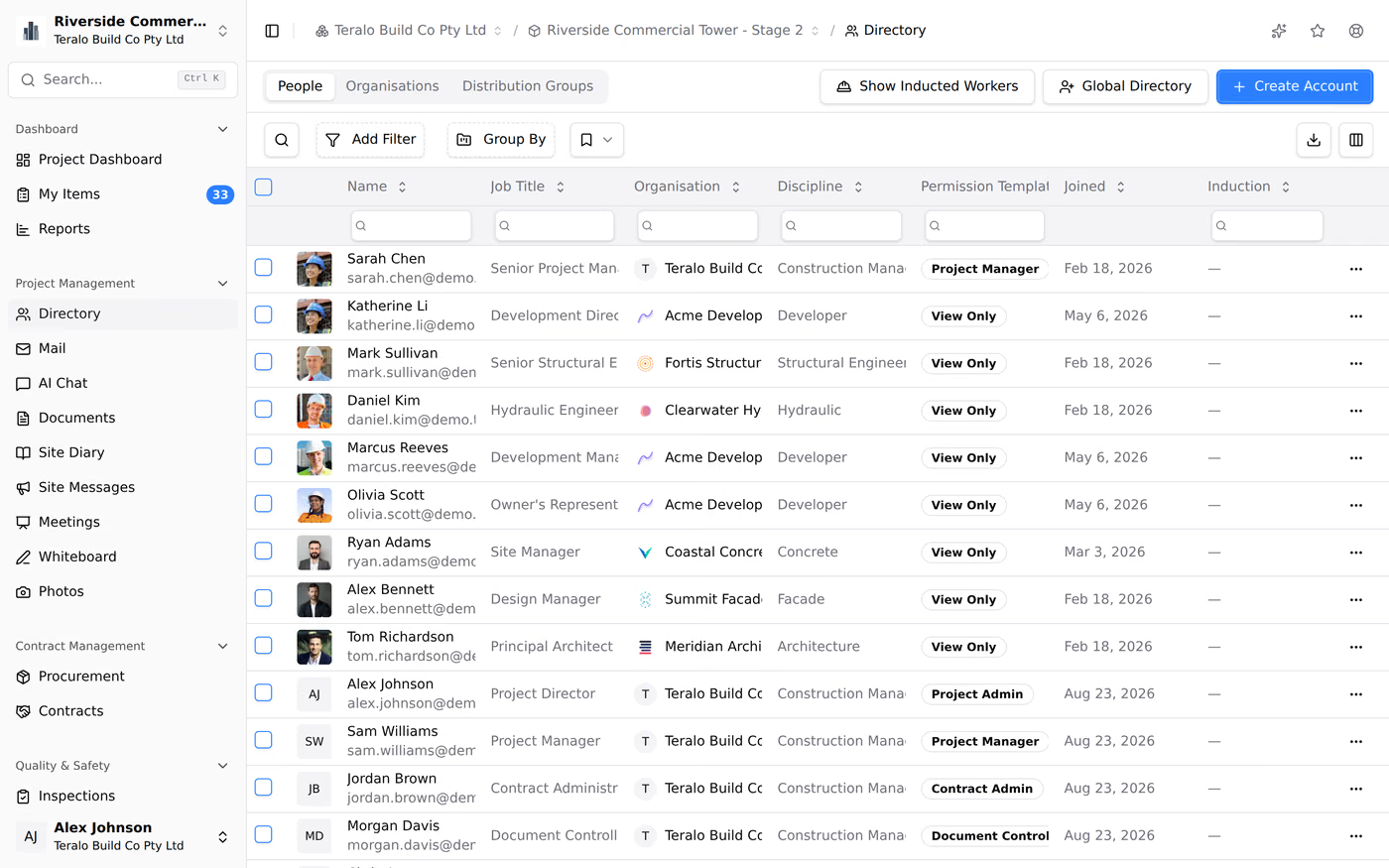
A chip on the organisation shows Pending Org Approval, Unaffiliated or Removed when the person isn't an active member of it.
Select a person to see their details, including their phone number and what their permission template allows. Nobody can edit another person's details; each person edits their own in their profile.
To export the register, select the download icon, then CSV or PDF.
Select Show Inducted Workers to add the workers with an approved or pre-approved induction who aren't members of the project. Each one shows a Site Worker badge. The button appears only when the project has such workers. Learn more about inductions.
Organisations lists each company with people on the project: Name, Accounting, Compliance, Project Members and Joined. A company appears here once someone from it is added. The tab is read-only. Select a company to see its details.
- On the People tab, select Global Directory.
- Search by name, email, job title or organisation. Enter at least 3 characters.
- Select the plus icon on the person's row. To add several people, tick them and select Add Selected.
- Choose a Permission Template, then select Add to Project.
Teralo emails each person to say they've been added to the project.
- On the People tab, select Create Account.
- Choose the Organisation. The list holds the organisations on the project, and your own.
- Enter the Email Address.
- Enter the First Name, and optionally the Last Name and Job Title.
- Choose the Project Permission Template.
- Select Create & Add.
A new account gets a welcome email with a temporary password and a Set New Password link, which works for 24 hours.
If the email address already belongs to an account, the name and job title are locked. A member of the organisation you chose is added at once and emailed (Add to Project). Anyone else is sent an invitation, and joins the project when they accept (Send Invitation). Learn more about inviting people to a project.
The Organisation list tags an organisation Requires Approval unless you are a member of it and can add people to it. A new account in that organisation can use the project straight away, and shows as Pending Org Approval until the organisation approves their membership.
If the person's company isn't on Teralo, select create a new one under the Organisation list in Create Account.
- Under Organisation Details, enter the Organisation Name, and optionally the Country / Region, Business Number and Discipline.
- Under Organisation Administrator, enter the administrator's details and choose their Project Permission Template, then select Create & Continue. The administrator needs a new account.
- Optionally, add more people with Add Account, then select Done. Otherwise, select Skip. Anyone who already has a Teralo account is invited.
- Check the summary, then select Confirm & Create.
If the company is already on Teralo, add one of its people with Global Directory and it appears in the list.
Invitations lists every invitation sent to the project, with the person, Organisation, Role, Invited By, Sent, Status and Expires / Answered. A badge on the tab counts the open invitations. From a row's three-dot menu, select Resend invitation or Withdraw invitation. Learn more about project invitations.
- On the People tab, select the three-dot menu on the person's row, then Remove.
- Select Remove User.
The person loses access to the project, and Teralo emails them. To remove several people, tick them, select Delete, then Remove Users.
- In the project sidebar, under Project Settings, select Permissions, then User Assignments.
- Change the template on the person's row. To move several people, tick them, choose Move to template, then select Apply.
Learn more about permission templates.
A distribution group is a named list of project members. Choosing a group in Mail, Site Messages or Meetings adds each of its members. A group gives its members no access.
To create one:
- On the Distribution Groups tab, select Create Group.
- Enter a Name, and optionally a Description (Optional).
- Select Create Group.
- On the group's card, select Add Members, choose the people, then select Add Member(s).
Anyone who can view the directory, guests included, can create a group. Only the person who created a group can rename it, delete it or change its members.
Directory in the organisation sidebar lists your organisation's active members. Administrators add people to the organisation there, with Add Existing People and Create Account. Learn more about members and user applications.
A guest sees everyone on the project, with their contact details. The Induction column shows statuses for their own company only, and Show Inducted Workers lists only their own company's workers. Accounting on the Organisations tab is filled in for host staff only.
Only the host adds or invites people to a project: a guest sees Global Directory and Create Account unavailable, and has no Invitations tab. A guest's organisation administrator can add people to their organisation, and the host then adds them to the project.
Directory has no tool settings page. It uses:
- each organisation's Discipline, set in its organisation settings from a fixed list;
- the project permission templates, set under Permissions at organisation and project level.
| Permission | Allows |
|---|---|
| Can view the project directory | Seeing the directory and creating distribution groups |
| Can add people to the project | Adding and inviting people, and the Invitations tab |
| Can remove people from the project | Removing people |
Adding and removing people are host only. Adding someone gives them an existing permission template, and doesn't change what a template allows. Learn more about how permissions work.