Site Messages
Broadcast short notices by dashboard, email, SMS or sign-in.
Part of Project Management.
Found in each project. What's the difference?
Hosts decide access; guests see every published message and their own company's drafts.
Site Messages broadcasts short notices to the people on a project: on the project dashboard, by email, by SMS, or at site sign-in. Recipients can't reply to a site message. For correspondence that needs an answer, use Mail.
Warning: Publishing an email or SMS message sends it to every recipient straight away.

- In the sidebar, select Site Messages, then New Message.
- Choose the Distribution Method.
- Enter the Content, and a Title for any method other than SMS.
- For Email, SMS or All Methods, choose the Recipients.
- Optionally, turn on Schedule and choose a Publish Date and Publish Time, or turn on Set Expiry and choose an Expiry Date.
- Select Publish. With a publish date set, the button reads Schedule.
To finish a message later, select Save Draft. To publish a draft, open it and select Publish. A published message can't be edited.
The Distribution Method decides where a message appears, and the rest of the form changes to match.
- Website: on the project dashboard, which shows the latest published message. It has no recipients.
- Email: emailed to the recipients.
- SMS: texted to each recipient's mobile number, from their profile. The text starts with the project's name.
- Sign-in / Sign-out: shown to workers and visitors when they sign in at the site kiosk or by QR code. Each one selects I Acknowledge before signing in. Learn more about site sign-in.
- All Methods: all four. The form also shows an SMS Preview.
Email, SMS and All Methods messages need recipients. Under Recipients, choose people, grouped by company, or a distribution group.
Tick Include currently signed-in workers to add everyone signed in on site when you save the message. Only workers whose induction is linked to a Teralo account are added.
A person who has turned off site message emails in their notification settings gets neither the email nor the SMS. The recipient list marks them.
As you write an SMS, the form counts its characters and segments, and multiplies them by the number of recipients to show how many texts will be sent. Workers added through Include currently signed-in workers aren't in that count.
Each organisation has a monthly SMS limit, 2,000 texts by default. A message that would go over the limit can't be saved or published. To change the limit, contact support.
For an SMS or All Methods message, tick Emergency / evacuation - bypass the monthly SMS limit. Emergency texts don't count towards the limit and are sent even when it has been reached.
People who have turned off site message emails don't receive emergency texts either.
You can add attachments once a message is saved. SMS messages don't take attachments.
- Open the message.
- Select Add Attachment, then choose the file.
Each file can be up to 25MB.
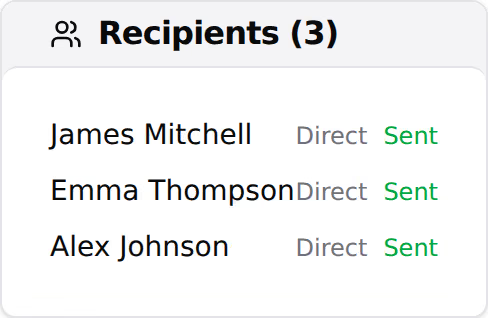
While a message is published, its Recipients card lists each recipient, how they were added (Direct, Group or Signed in) and a delivery status:
- pending: not sent yet, or the recipient has no email address or mobile number, or has turned off site message emails.
- sent: Teralo has sent it. This doesn't confirm delivery.
- failed: Teralo couldn't send it.
Open the message and select PDF. The PDF holds the message's details and content, its recipients with their delivery status, and the names of its attachments.
- Open the message.
- Select the three-dot menu, then Archive.
A message with an expiry date is archived when it expires. Archived messages stay in the register.
Warning: Deleting a message is permanent.
- Open the message.
- Select the three-dot menu, then Delete.
- Select Delete.
- Draft: saved and not published.
- Scheduled: waiting for its publish date.
- Published: sent and showing.
- Archived: archived by hand, or expired.
Site Messages opens on a register with the columns #, Title, Method, Status, Published and Created By. Each message is numbered in order, from SM-001.
Open a message to see its content, attachments, details and recipients, and to comment in its Activity log.
A guest sees every published and archived message on the project, and their own company's drafts and scheduled messages.
Site Messages has no settings page. Messages use the distribution groups set up in the Directory.
| Permission | Allows |
|---|---|
| Can view site messages | Opening the register and messages |
| Can create and publish site messages | Creating messages, editing drafts, publishing, attachments and comments |
| Can manage and archive site messages | Archiving messages |
| Can delete site messages | Deleting messages |
Recipients receive a message on the dashboard, at sign-in, by email and by SMS without any of these permissions.