Meetings
Run agendas and minutes, and track the actions that follow.
Part of Project Management.
Found in each project. What's the difference?
Hosts set it up; guests see the meetings they attend and those their company created.
Meetings holds a project's meetings: each one's details, attendees, agenda items and minutes. Meetings of the same type are numbered as a series, and a follow-up meeting carries forward every item that isn't closed.
Meetings has three tabs:
- Calendar: meetings on their dates, marked Awaiting Minutes or Minutes Issued. Once a recurring meeting's minutes are issued, its next 12 dates show as Scheduled (recurring). Selecting one of those opens the meeting it follows.
- List: a register with the columns #, Type, Title, Date, Status and Author.
- Actions: every item that isn't closed, from the meetings you can see, with its Meeting, Action Item, Responsibility, Due Date, Priority, Status and Meeting Type. Select a meeting number to open the meeting.
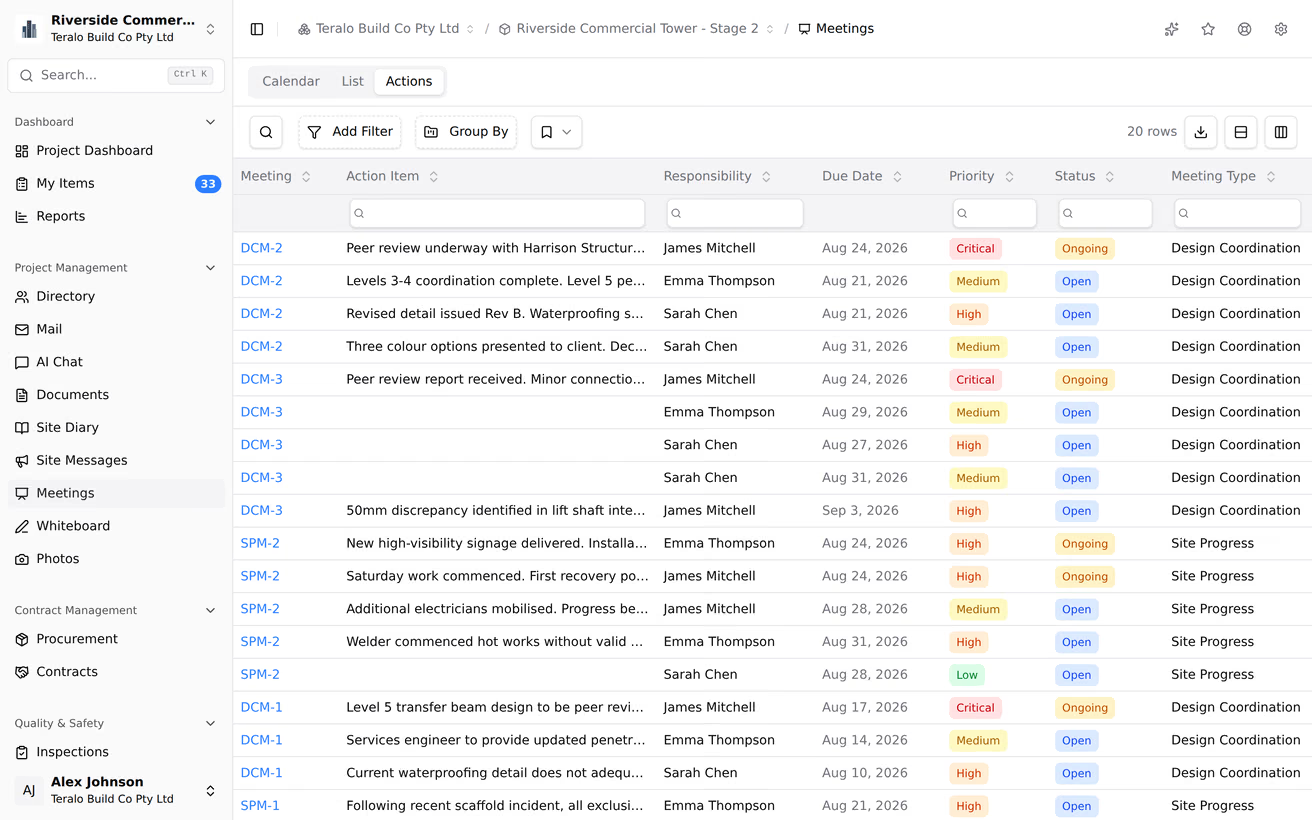
Items that name you as Responsibility and aren't closed also appear in My Items.
- In the sidebar, select Meetings, then New Meeting.
- Choose the Meeting Type.
- Enter the Title and Date, and optionally the Start Time, End Time, Location and Overview.
- Optionally, tick Recurring meeting and choose a Frequency: Daily, Weekly, Fortnightly or Monthly.
- Select Add Attendee, then choose people or a distribution group.
- Select Create.
Teralo emails the attendees. The meeting type sets the meeting's number and its agenda sections, and can't be changed after the meeting is created. A recurring meeting doesn't create later meetings by itself: it adds their dates to the calendar, and Follow-up creates each one.
If no meeting types are set up for the project, New Meeting shows "No meeting types configured".
While a meeting is Awaiting Minutes, change its details or attendees, then select Save. Teralo emails the attendees each time the meeting is saved.
Each attendee's status is Present, Absent or Distribution. Attendees start as Distribution. To change one, select the status beside the attendee's name.
To let attendees sign themselves in:
- On the meeting, select QR Sign-in to show the code.
- Each attendee scans it, signs in to Teralo, and selects Sign in as present.
Only people already on the attendee list can sign in this way. To keep a paper sign-in sheet, select Upload Attachment under Attendance Attachments and add a photo of it.
The agenda's sections come from the meeting type's template. A meeting can't add sections of its own, so a type with no template shows "No sections defined" and can't take items.
- Under a section, select Add item.
- Enter the Description.
- Optionally, choose the Responsibility, a Priority and a Due Date.
- Select Add.
Teralo emails the person responsible. Each item's status is Open, On Hold, Ongoing or Closed; select it to change it. To attach a file, edit or delete an item, use the vertical three-dot menu beside it.
Items can be changed only while the meeting is Awaiting Minutes.
- Under Attachments, select Add Attachment.
- Choose project records, such as documents or photos, or upload a file.
To bring an attachment across to the next meeting, select its carry forward icon. It then reads Carry forward. An item's own attachments travel with the item.
Warning: Issuing doesn't save unsaved changes, and can't be undone. Select Save first.
- Select Save.
- Select Issue.
The meeting moves to Minutes and becomes read-only, items included.
Once the minutes are issued, anyone who can open the meeting can comment on its items:
- Select the speech bubble icon on the item.
- Enter the comment, then select the send icon.
On the latest issued meeting of a type, select Follow-up. The new meeting takes the next number in the series and today's date, and copies:
- the attendees and their statuses;
- the agenda sections;
- every item that isn't Closed, with its status, priority, due date, person responsible and attachments;
- the attachments set to carry forward;
- the title, location, times and recurrence.
The overview and comments aren't copied, and people no longer on the project are left off.
A carried-forward item shows Carried forward, and its note from the earlier meeting under Previous Meeting Notes. It keeps its original item number. Closing it doesn't close its copy in the earlier meeting, which still appears in Actions.
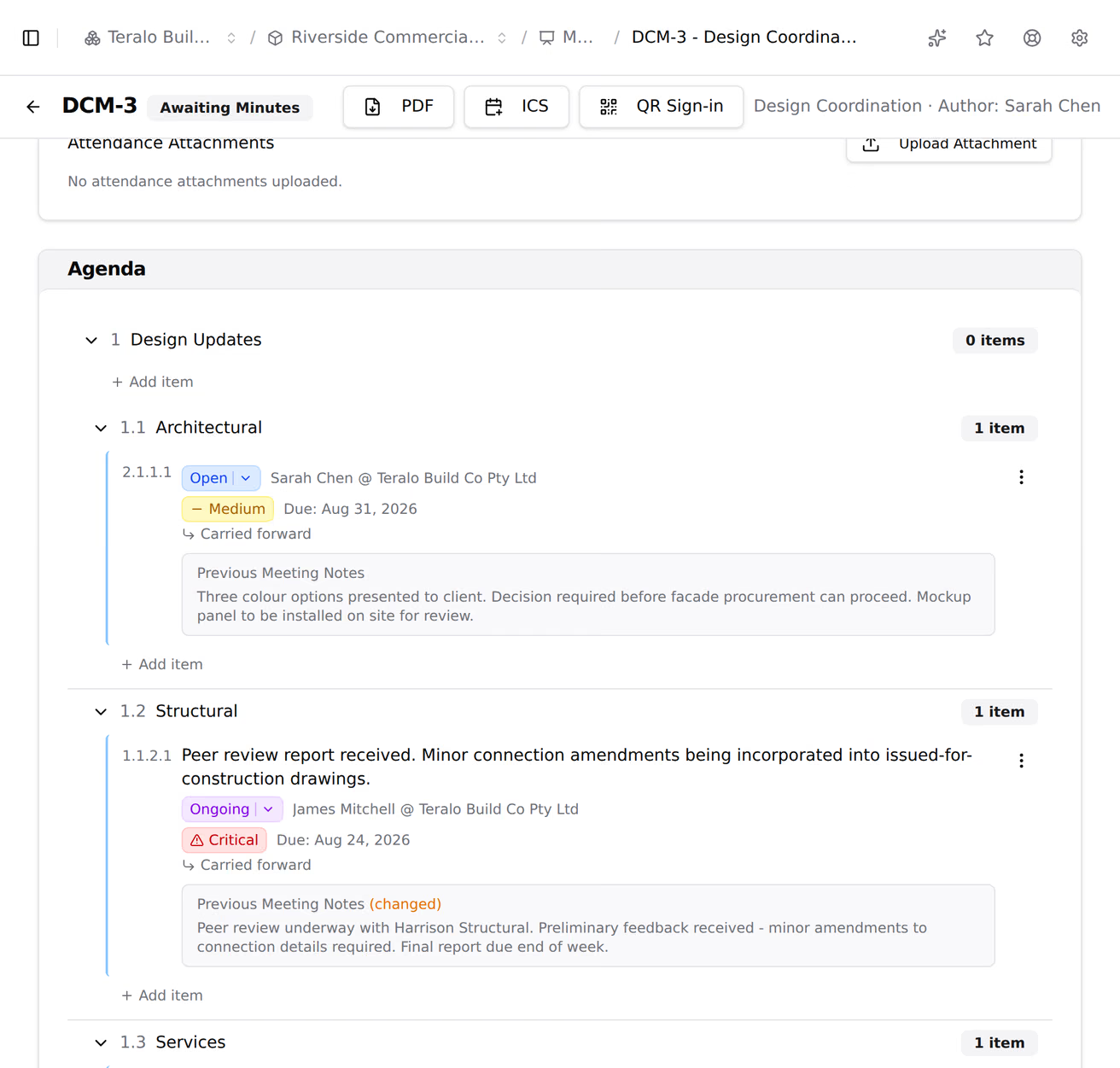
On the meeting, select:
- PDF for the minutes: details, attendance, each section's items with their comments, and attachments;
- ICS for a calendar file;
- QR Sign-in for the sign-in code.

On a phone, these are in the three-dot menu.
Warning: Deleting a meeting is permanent, and deletes its minutes.
- On the meeting, select Delete.
- Select Delete.
Only the latest meeting of each type can be deleted. Teralo emails the attendees that it's cancelled.
A guest sees the meetings they're an attendee of, with any status, and meetings created by someone in their company. In Actions and My Items, they see the items assigned to them and the items in meetings they can see. Host staff with the view permission see every meeting.
Anyone on a meeting's attendee list can open it read-only, without any meetings permission.
Meeting types are set up at organisation level. In the sidebar, under Organisation Settings, select Tools, then Meetings.
- To add a type: select New Meeting Type, enter a Name, a Prefix of 2 to 6 capital letters, and a Description, then select Add Meeting Type. A type with no prefix is numbered MTG.
- To add the defaults: on an empty list, select Create Defaults. This adds Design Coordination, Site Progress, Safety Committee, Client Progress and Subcontractor Coordination.
- To build a type's agenda template: open the type. Under Sections, select Add Section, and use the icons beside each section to add a subsection, rename it or delete it. Select a section's handle for Move Up, Move Down, Indent, Outdent and more. Select Save.
On a project, Project Settings, then Tools, then Meetings, lists the organisation's types. Turn on Activate beside each type the project uses, or select Activate All. Add Custom Type adds a type for this project only.
| Permission | Allows |
|---|---|
| Can view all meetings in the project | Opening the register and meetings beyond the ones you attend |
| Can create meetings | Creating meetings |
| Can edit meetings | Editing details and attendance, attachments, issuing and follow-ups |
| Can delete meetings | Deleting meetings |
| Can manage meeting actions | Adding, editing and deleting items, and setting their status |
A follow-up needs both Can create meetings and Can edit meetings. Can manage meeting actions doesn't include viewing meetings.