Send numbered project correspondence with a full record.
Part of Project Management.
Found in each project. What's the difference?
Hosts set up the templates; everyone sees only mail to or from their own company.
Mail holds a project's numbered correspondence, such as requests for information and site instructions. Each mail has a type, a number, recipients, attachments and an optional response due date. People without a Teralo account receive mail by email and can reply to it.
You see the mail your company sent or received. This applies to the host's staff as well as to guests.
Mail has two tabs:
- Inbox: sent mail where the sender or a recipient is in your company, including mail you sent.
- Drafts: your company's unsent mail. A colleague's draft shows who drafted it.
The register's columns are Mail Number, Content, Date Created, From, Organisation, Recipients, Type and Status. Recipients lists the To recipients. A sender without a Teralo account shows as External. Learn more about registers.
Mail where you're a To recipient and a response is due also appears in My Items.

- In the sidebar, select Mail, then Create Mail, and choose the mail type.
- Choose the To and Cc recipients.
- Enter the Subject.
- Optionally, choose a Response and a due date, and a Status.
- Fill in any Additional Information the mail type asks for.
- Optionally, select Add Attachment.
- Write the Message.
- Select the paper plane icon, Send Mail.
To finish later, select the disk icon, Save Draft. The Mail Type, To and Subject are required.
Recipients can be people on the project, a distribution group, which adds each of its members, or an email address you type. Teralo emails each recipient, unless they've turned mail emails off.
The default responses are Acknowledge, Approved, Approved with Comments, Not Approved, Revise and Resubmit, For Information, For Review and For Action. The default statuses are Draft, Open, Response Required, Response Received and Closed.
A mail number takes the form ACMECO-RFI-00042:
- the host organisation's mail prefix, whoever sends the mail;
- the mail type's prefix;
- a number, in sequence for that pair of prefixes across all of the host's projects.
A draft is numbered DRAFT-00001 until it's sent.
Select Add Attachment to attach files from your computer, up to 25MB each, or records from the project: documents, mail, whiteboards, contracts, meetings, observations, submittals, incidents, inspections, permits, method statements, inductions, safety data sheets, equipment, site diary entries, site messages, bookings, photos, procurement packages and programs.
- A file is attached as a copy.
- A document is attached at the revision you chose. Sending it makes it visible to the recipients' companies.
- Any other record links to the record itself. A recipient needs permission to open that tool, except for photos.
- A whiteboard gives each To and Cc recipient with a Teralo account view access to it, when the mail is sent. This replaces any edit access they had. Learn more about Whiteboard.
Recipients without an account receive attached files and documents with the email, up to 25MB.
- Open the mail.
- Select Reply all, or select the three-dot menu, then Reply or Forward.
- Choose the Mail Type, write the message, then select Send Mail.
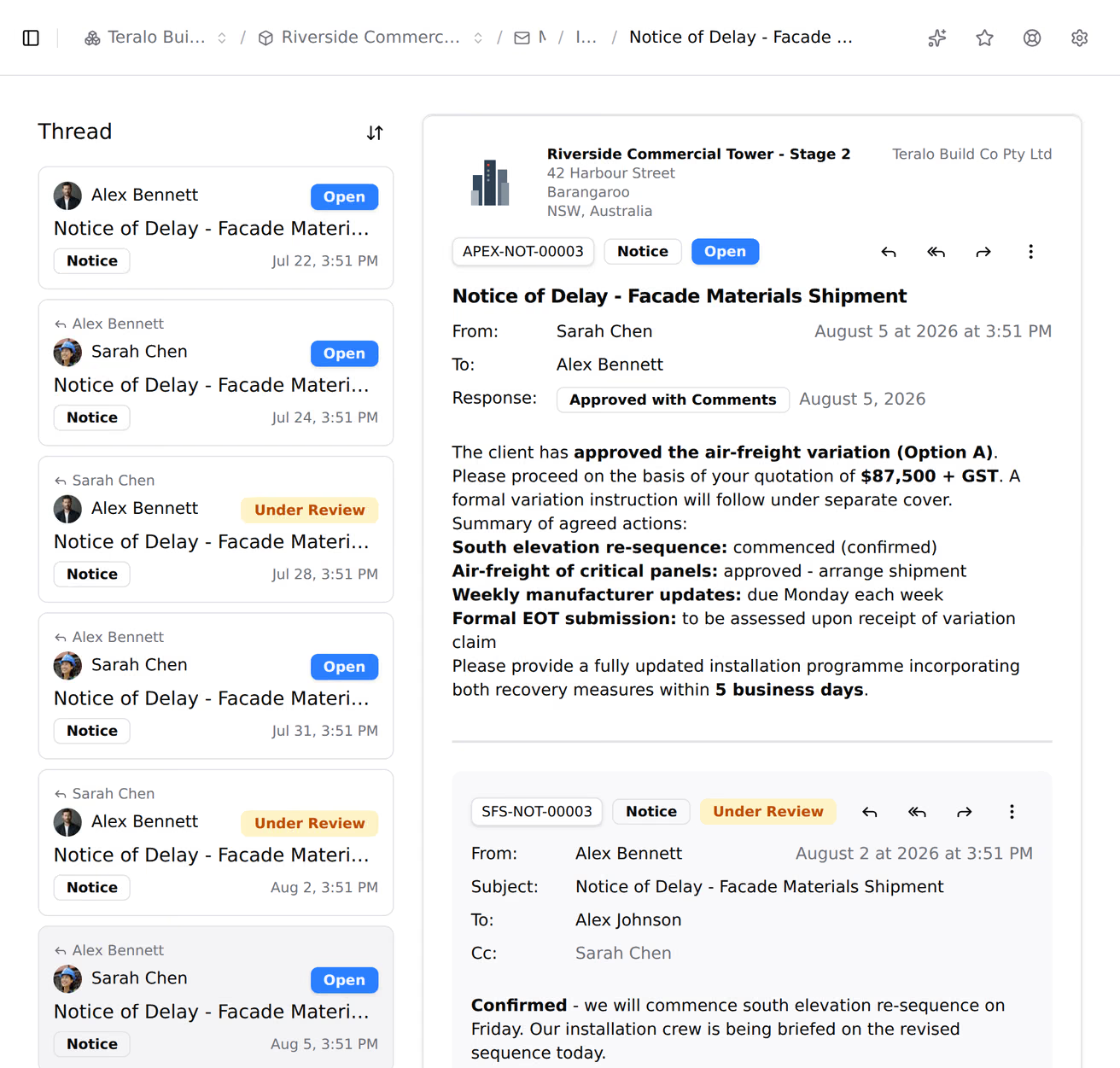
Reply addresses the sender. Reply all addresses the sender and copies the original recipients. Forward attaches the original mail. The earlier mail in the thread shows below the form.
The thread lists the mail in it that your company sent or received, each with its own number. To change the order, select Sort oldest first or Sort newest first.
Each recipient's email has its own reply address. A reply sent from the address that was mailed comes back into the thread as a new mail of the same type, with its own number and attachments. It's marked External, or via email when the sender has an account.
- Open the mail.
- Select the three-dot menu, then Change status. You can also select the status badge.
- Choose the status, then select Save changes.
To clear the status, select Remove Status. To see earlier statuses, select History. Teralo emails the people on the mail when its status changes. To change several at once, tick them in the register and select Change Status.
There's no separate close action. To close a mail, set its status to Closed.
- Open the mail.
- Select the three-dot menu, then Change response.
- Choose the Response Type and Due Date, then select Save changes. To remove them, select Clear Response.
Only the host organisation and the sender's company can change a response.
On the Drafts tab, select the three-dot menu on the draft's row, then:
- Edit to open it;
- Delete, then Delete Draft, to delete it.
You can delete only your own drafts. Sent mail can't be deleted.
- The register: select the download icon, then CSV or PDF.
- One mail: select the three-dot menu, then Export PDF or Print. Copy link copies the mail's address.
Text templates are saved passages you insert into a message with Insert template.... They're held at organisation and project level, where they can be limited to particular mail types, and in your own mail settings.
Signatures are yours. To add one:
- Select your name at the bottom of the sidebar, then Settings, then Mail.
- On the Signatures tab, select Add Signature.
- Enter a Name and the Content.
- Under Set as Default For, choose New Mail, Replies or Forwards.
To choose a different signature while writing, select Change signature.... The Notifications tab in the same settings has Include attachments in notifications.
Organisation Settings, then Tools, then Mail, has five tabs:
- Mail Prefix: the organisation's prefix, up to 8 characters. Teralo creates it from the organisation's name.
- Mail Types: each with a Name, a Prefix of up to 8 characters, a Description and any custom fields. A custom field is text, a number, a currency amount or a date, and appears under Additional Information when someone writes that type.
- Mail Statuses, Mail Responses and Text Templates.
On an empty tab, Create Defaults adds the default set. The default mail types are General Correspondence (GEN), Request for Information (RFI), Site Instruction (SI), Variation Request (VR), Meeting Minutes (MM), Progress Report (PR) and Safety Notice (SN).
Project Settings, then Tools, then Mail, has the types, statuses, responses and text templates tabs. Turn on Activate beside each organisation entry the project uses, or select Activate All. Each tab also has a list of entries for this project only.
| Permission | Allows |
|---|---|
| Can view project mail | Reading mail, and changing the status of mail you're on |
| Can send mail on behalf of the project | Writing, sending and replying |
| Can delete project mail and drafts | Deleting your own drafts |
| Can create and manage mail templates for the project | Managing the project's mail settings and text templates |
Sending mail doesn't include reading it. Managing mail templates is host only.