Permission templates
Build a role once and apply it to everyone who needs it.
Found in each project and your organisation. What's the difference?
Hosts write project templates; each organisation's administrators write its own.
A permission template is a named set of permissions. Every member of an organisation holds an organisation template, and everyone on a project holds a project template. The template decides which tools a person sees and what they can do in each. Learn more about how permissions work.
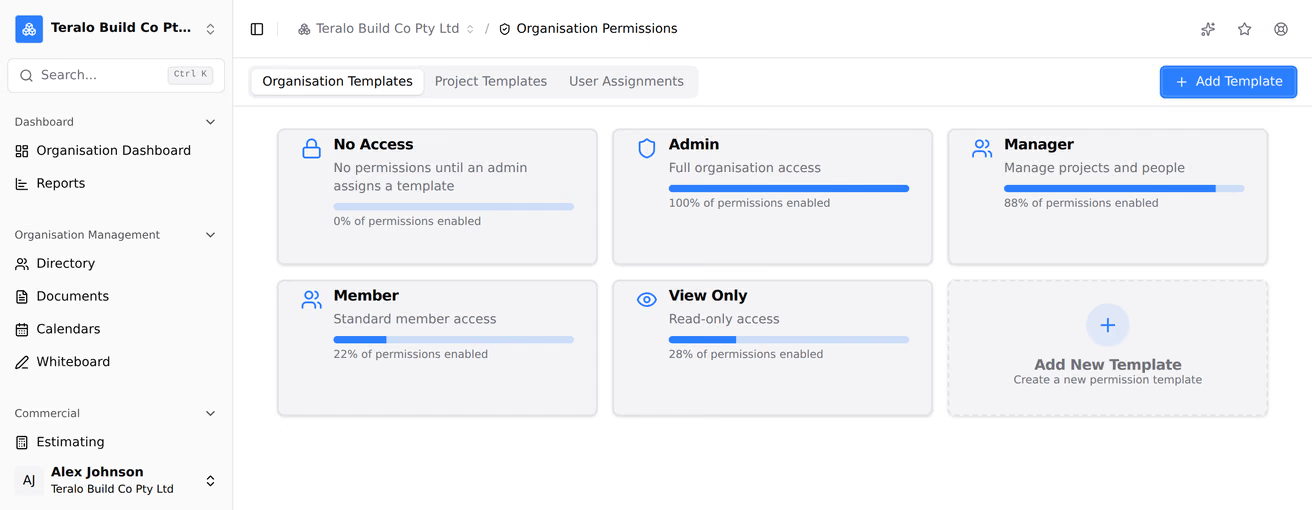
An organisation created with the recommended defaults starts with these templates.
- Organisation templates: Admin, Operations Manager, Commercial Manager, Estimator, HSEQ Manager, Accounts, Office Administrator, Staff, View Only and No Access.
- Project templates: Project Director, Office Team, Site Team, Client, Superintendent, Consultant, Subcontractor Manager, Subcontractor Supervisor, Crane Crew, View Only and No Access.
No Access grants nothing. An organisation created with Start blank instead, or added from a project's directory, starts with No Access only. Every other default is offered as a starting point whenever you create a template.
- In the organisation sidebar, under Organisation Settings, select Permissions.
- Select the Organisation Templates tab, or Project Templates for a project template.
- Select the Add New Template card.
- Choose a default template to start from, or Custom Template to start with nothing ticked.
- Enter a Template Name, and optionally a Description (Optional) and an Icon.
- Under Configure Permissions, tick the permissions the template grants.
- Select Create Template.
Only an organisation administrator can create a template. A project template created here is offered on every project your organisation hosts.

The permissions are grouped by module, with a row for each tool and View, Add, Edit and Delete columns.
- Ticking a column ticks every column to its left in the row. Unticking one unticks every column to its right. The Progress Claims and Variations rows don't do this.
- Select all on a module ticks every column in it, Delete included. Clear unticks them.
- The AI Chat and Host AI allowance rows have a single Allow switch.
- Select the info icon on a row to see what it grants and what else it ticks.
- Some rows carry a badge saying they apply to host staff only. On a guest's template they grant nothing.
- Select the template's card.
- Change the name, description, icon or permissions.
- Select Save Changes.
The change applies to everyone on the template from their next action in Teralo. Their sidebar updates when they next load a page. Teralo doesn't notify anyone that a template changed.
A project template written on the organisation page belongs to the organisation. A project shows it in two places:
- Org Templates: the organisation's template, read-only. Selecting it opens View Permission Template.
- Project Templates: the project's own copy, made by Activate All Templates when the project was created, which can be edited on that project. Editing the organisation's template later doesn't change the copies already on projects.
A project created with Skip for now has no copies: its Project Templates tab holds only No Access. People on it can still be given the organisation's templates.
Add Template on a project's Permissions page creates an organisation template too, offered on every project.
- Open Permissions under Organisation Settings, or under Project Settings on a project.
- Select the User Assignments tab.
- Choose a template on the person's row.
To move several people, tick them, choose a template under Move to template, then select Apply.
Moving someone on a project sends them a notification. Adding someone to a project also gives them a template. Learn more about inviting people to a project.
Warning: Deleting a template can't be undone. Any dashboard, calendar, folder or document access rules that name the template are removed with it.
- Select the template's card, then Delete Template.
- If anyone is on the template, choose a template under Move everyone to, then select Move and delete. Otherwise, select Delete Template.
Teralo doesn't delete a template while anyone is on it, so nobody is left without one.
A guest is assigned one of the host's project templates, from the same list as host staff. Permissions for host staff only have no effect on a guest, and User Assignments shows a warning on the guest's row when their template holds any.
A guest organisation's administrators write organisation templates for their own organisation and assign their own members to them.
Templates are managed on two pages:
- Organisation Settings, then Permissions: the Organisation Templates, Project Templates and User Assignments tabs. The Project Templates tab appears only on a host account.
- Project Settings, then Permissions: the Org Templates, Project Templates and User Assignments tabs for one project. Only host staff can open it.
| Permission | Allows |
|---|---|
| Can view organisation permission templates and assignments | Opening the organisation Permissions page |
| Can manage organisation permission templates and assignments | Editing and deleting templates |
| Can view project permission templates and assignments | Opening a project's Permissions page |
| Can manage project permission templates and assignments | Moving people between templates on that project |
Only host staff can hold the two project permissions. Creating a template and assigning organisation templates need an organisation administrator. Choosing a template while adding someone to a project needs only Can add people to the project.
No. A template added on a project's Permissions page is offered on every project your organisation hosts. A project's own templates are the copies made when it was created.
An organisation administrator has every permission in their organisation and on the projects it hosts, whatever their template says.