Safety Data Sheets
Keep your SDS register complete and in date.
Part of Quality & Safety.
Found in each project. What's the difference?
Hosts set it up; guests add their own sheets and see every one on the register.
Safety Data Sheets is the project's register of chemicals and other hazardous substances on site. Each entry holds the substance's safety data sheet (SDS), its hazards, and the organisations that use it.
In the project sidebar, under Quality & Safety, select Safety Data Sheets. The register lists every current sheet on the project, with the columns Product Name, Organisation, UFI, GHS Pictograms, Signal Word, Hazard Classification, Expiry Date, SDS Issue Date and Status.
An Expiry Date shows in amber within 30 days of the date, and in red once it has passed.
A sheet's status is one of:
- For Review: submitted and waiting for a reviewer.
- Accepted: reviewed and accepted.
- Rejected: sent back to the organisation that submitted it.
- Not In Use: the substance is no longer on site, or the sheet has been replaced.
Learn more about the register screen.
- On the register, select New SDS.
- Under Upload SDS PDF, select Choose PDF and choose the sheet. Teralo reads the PDF and fills in the form.
- Under Organisation, choose the organisations whose workers use the substance on site.
- Check each field Teralo filled in, and correct any that are wrong.
- Select Create SDS.
The PDF is optional, but it's the only way to attach the sheet's file. Reading a PDF uses AI credits.
The Organisation list holds the organisations with at least one person on the project.
Teralo reads these fields from the sheet:
- the Product Name, Manufacturer and UFI (Unique Formula Identifier);
- the Hazard Classification, the Signal Word (Danger or Warning) and the GHS Pictograms;
- every hazard statement (H code) and precautionary statement (P code), with its text;
- the Emergency Contact, Expiry Date and SDS Issue Date.
Hazard and precautionary statements can't be typed in. You can only remove one that Teralo read, with Remove beside it.
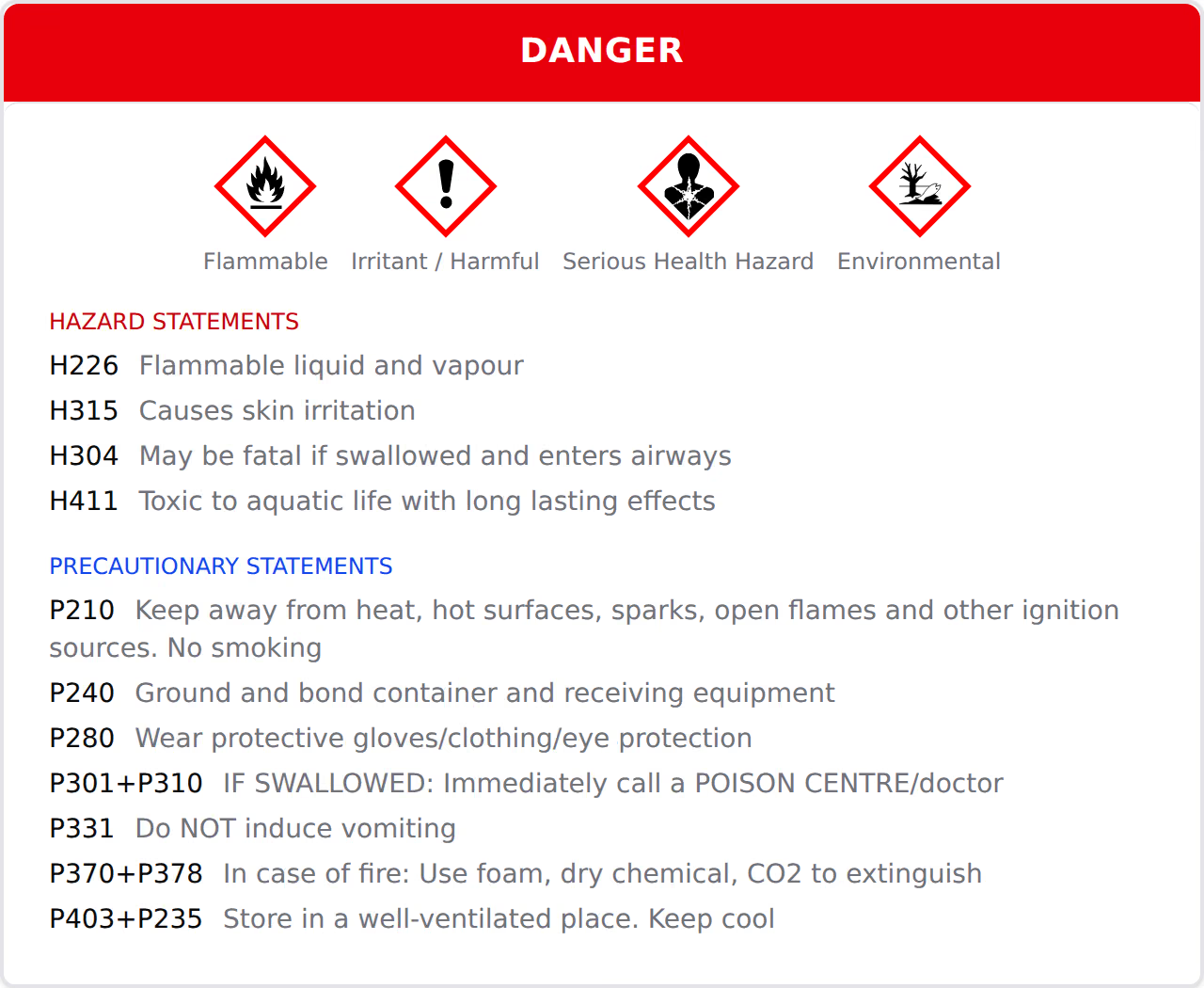
When you leave the Product Name, Manufacturer or UFI field, Teralo checks the project for the same sheet. It matches on the UFI first, then on the product name and manufacturer together. If it finds one, the form shows a warning with two choices:
- Link Organisation: adds the first organisation you chose to the existing sheet, instead of creating a new one.
- Create Anyway: carries on creating a new sheet.
The check covers every sheet on the project, whatever its status.
- On the register, select the Bulk Upload tab.
- Drop up to 50 PDFs onto the page, or select browse and choose them.
- Under Organisation, choose the organisations that use these substances. The choice applies to every sheet in the batch.
- Select Extract All. Teralo reads each PDF in turn.
- Check each sheet's fields, and correct any that are wrong.
- Select Create All.
If a PDF can't be read, select Retry Failed to try it again. A sheet that matches one already on the project shows a warning, with View Existing and Dismiss.
A sheet starts its review when it's created. With the default workflow, a sheet created by host staff who can review sheets is accepted straight away. Every other sheet goes to For Review.
To review a sheet:
- Open the sheet.
- Select Accept, or select Reject and enter the reason in Notes.
A rejected sheet goes back to the organisation that submitted it, with a Revise and resubmit task. To resubmit it, open the sheet, select Complete on the task, and optionally enter resubmission notes. The sheet returns to For Review.
On an Accepted sheet, select Mark Not In Use. The sheet leaves the public register. To bring it back, select Mark In Use.
Neither is available while the sheet's workflow is running.
When a manufacturer issues a new sheet, replace the old one. Replace with New Version appears on a sheet that is Rejected, Not In Use or past its Expiry Date. To replace an accepted sheet that's still in date, mark it not in use first.
- Open the old sheet and select Replace with New Version.
- Under Upload SDS PDF, choose the new sheet. The form starts with the old sheet's details, except its dates.
- Check the fields, then select Create SDS.
The new sheet starts its own review. The old one is marked Not In Use, leaves the register, and stays readable from the new sheet's Version History card. Permits and method statements already linked to the old sheet stay linked to it.
Warning: Deleting a sheet is permanent, and deletes its PDF and its review history.
- On the register, open the row's three-dot menu and select Delete SDS.
- Select Delete SDS again to confirm.
To delete several, select their rows, then select Delete.
On the register, select the download icon, then CSV or PDF.
Every project's public portal has a Safety Data Sheets button under Site Access. It opens the project's register for anyone with the link, with no Teralo account needed.
The public register shows only accepted sheets that haven't been replaced. Sheets that are For Review, Rejected or Not In Use don't appear.
To share it, select QR on the register. The Public SDS Register dialog shows the link, with Download PDF and Print for the QR code.
Guests see every sheet on the register, from every organisation and in every status. With Can create and submit Safety Data Sheet entries, they can add sheets and complete their own organisation's Revise and resubmit tasks.
When a guest reads a PDF, Teralo charges the guest's own organisation's AI credits, unless the host has let them use the host's.
The settings are on the project. In the project sidebar, under Project Settings, select Tools, then Safety Data Sheets. The Workflows tab holds the review workflow. There are no types or categories to set up.
At organisation level, the same page sets the default workflow for every project. Turn on Locked to stop projects choosing a different one.
| Permission | Allows |
|---|---|
| Can view the Safety Data Sheet register | Seeing the register and every sheet |
| Can create and submit Safety Data Sheet entries | Adding sheets, uploading in bulk, and completing your organisation's revise tasks |
| Can review, accept, and manage all Safety Data Sheet entries | Accepting and rejecting, marking sheets not in use, replacing sheets, and the QR button |
| Can permanently delete Safety Data Sheet entries | Deleting sheets |
Manage includes create, and create includes view. Delete is separate. Learn more about how permissions work.
Every sheet runs the workflow bound to the tool. A sheet can't be created until one is bound.
To choose it, open the Workflows tab of the Safety Data Sheets settings. Under Review Workflow, choose a Workflow, then select Save. If the organisation has locked its workflow, the project shows Locked by organisation and keeps it.
The default template is SDS review. It accepts a sheet created by host staff who can review sheets, and sends every other sheet to a Review SDS decision with Accept and Reject. Only people with Can review, accept, and manage all Safety Data Sheet entries can decide.
Learn more about binding a workflow to a tool.