Progress claims
Claim work done, assess claims and certify payment.
Part of Contract Management.
Found in each project. What's the difference?
Guests submit claims on their own contracts; only the host approves them.
A progress claim records the work completed on a contract in one claim period. It is submitted, assessed and approved through the contract's workflow, and the approved claim certifies the amount due, less retention.
Claims are on each contract's Progress Claims tab, which is the tab a contract opens on. Learn more about contracts.
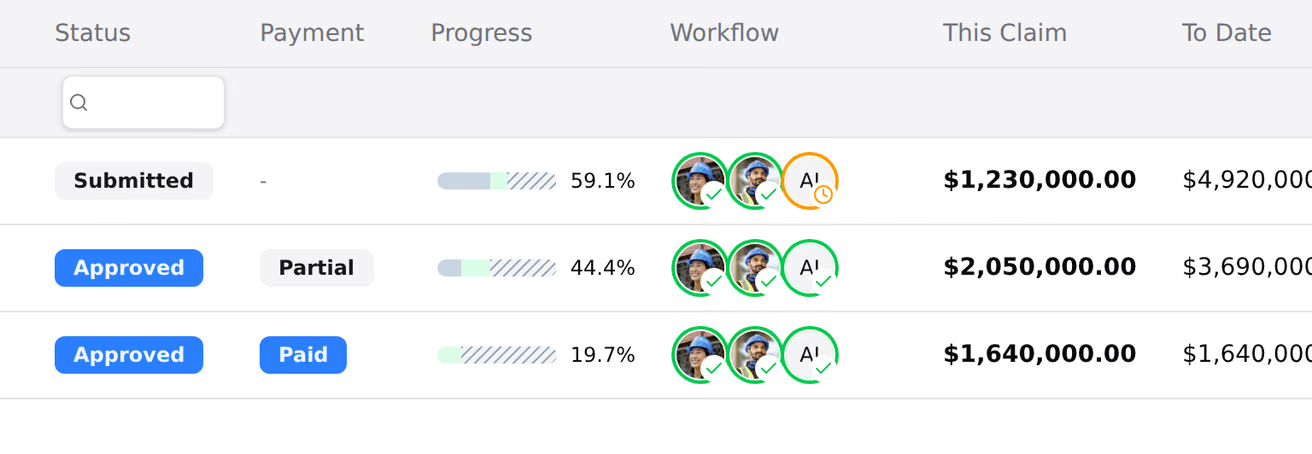
Each row is one claim, with the columns Claim, Period, Ext. Ref., Due Date, Status, Payment, Progress, Workflow, This Claim, To Date and Retention.
The Workflow column shows one ring per workflow step: green when done, red when rejected, amber with a clock for the current step, and grey for steps not reached. A step assigned to one person shows their avatar.
- On the contract's Progress Claims tab, select New Claim.
- Choose the period under Select Month, Select Week or Select Fortnight, depending on the contract's claim frequency.
- Optionally, enter Notes.
- Select Create Claim.
The claim opens with every line of the contract's schedule of values. Host staff can create claims, and so can the contracted organisation's people with Can submit progress claims while the contract's cross-organisation access is on. The host can raise a claim on the contracted organisation's behalf.
Teralo keeps claims in number order:
- A new claim can't be created while an earlier claim is Draft or Submitted.
- A claim can't be submitted while a lower-numbered claim is still open.
- A claim can't be changed once a later claim has been submitted.
The first claim on a contract can be for the current period or a later one. After that, each claim is for the next period, or for the same period as the latest claim, marked (additional claim).
The due date is the end of the period plus the contract's Payment Terms (Days). Without payment terms, a claim has no due date.

The claim's schedule groups its columns under When Complete, Prev. Approved, Claimed, Assessed and Retention. Select a group's heading to expand it.
- Expand Claimed.
- Choose This to enter this claim's progress, or Total to enter progress to date.
- On each line, enter the Qty, % Complete or Subtotal. The other two recalculate.
- Select Save Draft.
Teralo saves only when you select Save Draft. A percentage over 100 becomes 100, and an amount over the line's value becomes its value. Prev. Approved is the total of the line's earlier approved claims, at their claimed amounts.
Below the contract works, a Variation Works block lists the contract's approved variations that were created before the claim, with their own subtotal. Learn more about variations.

- Tick the lines to update.
- Select Bulk Update.
- Choose Percentage Complete, Claimed to Date (AUD) or Current Claim (AUD), and enter the value.
- Check the preview of a sample line, then select Apply.
- Select Save Draft.
To set the ticked lines' claim back to zero, select Reset. Bulk Update and Reset change contract works lines only.
- To a line: select the icon in its Supporting Information column, enter a note, add any files, and select Add Note.
- To the claim: enter text in the Notes card and select Save notes, or select Add on the Attachments card.
- An external reference, such as an invoice number: select the pencil icon beside External reference.
A contract can list the compliance documents its claims need. Every required document must be attached to a claim before it can be submitted.
- On the claim's Compliance tab, select Upload beside the document.
- Either:
- on Upload File, choose the files and upload them; or
- on From Library, choose one of your organisation's saved compliance documents and select Link Document.
The tab's dot is red while a required document is missing, orange once they are attached but not all verified, and green when every one is verified. A reviewer on the claim's current workflow step verifies each document by selecting Verify.
The default document types are Public Liability Insurance, Workers Compensation Insurance, Monthly Progress Report, Safety Declaration and Statutory Declaration. Each shows a frequency (once, monthly or per claim), but every required type is checked on every claim. Your organisation's library is the Compliance Documents card in its organisation settings.
Select Submit for review. Teralo saves any unsaved changes, starts the contract's progress claim workflow and marks the claim Submitted.
A claim can't be submitted until the contract has a progress claim workflow and the claim has every required compliance document. While documents are missing, the button reads Upload Compliance Docs.

Host staff assess a submitted claim line by line:
- Expand the Assessed group.
- Choose This or Total, then enter the assessed Qty, % Complete or Subtotal on each line you are changing.
- On each line assessed below the claimed amount, select the triangle icon, enter the justification, and select Add Justification.
- Select Save Assessment.
Save Assessment turns red while a reduced line has no justification, and the claim can't be approved until every one has. The contracted organisation sees the assessed figures.
An assessed amount sets the line's certified amount, its retention and the most that can be paid against it. Lines nobody assessed are certified at their claimed amount. Prev. Approved on later claims, and the budget's actual costs, use claimed amounts.
The reviewer on the current workflow step acts at the top of the claim's Claim tab:
- Approve: refused until every required compliance document is attached and verified and every reduced line has a justification. The button lists what is missing.
- Reject: enter a Reason, then select Reject.
With the default workflow, a rejected claim goes to a Revise claim task for the person who submitted it. Completing the task resubmits the claim under the same number.
When the last step approves, the claim is Approved and its retention is calculated. If your organisation has an accounting connection, Teralo exports the claim to it. A failed export shows Export failed with Retry export, and the approval stands.
On a Submitted claim, host staff can select Return to draft. Teralo cancels the workflow run and clears the claim's payment claim statement, which is fixed again when it is resubmitted. A claim the contracted organisation raised is hidden from the host again until it is resubmitted.
Warning: Deleting a claim is permanent.
- Select Delete Claim on the claim, or open its three-dot menu on the register and select Delete claim.
- Select Delete Claim to confirm.
Only Draft and Submitted claims can be deleted.
Retention is set on the contract, under Retention Configuration, on one of four bases:
- Percentage: a rate held off each claim, optionally capped at a percentage of the contract value.
- Max Value: a rate held off each claim, capped at a dollar amount.
- Bank Guarantee: nothing held.
- Tiered: the rate changes with the total claimed across the contract, band by band. A top band of 0% stops retention.
Variation lines use the contract's variation retention settings.
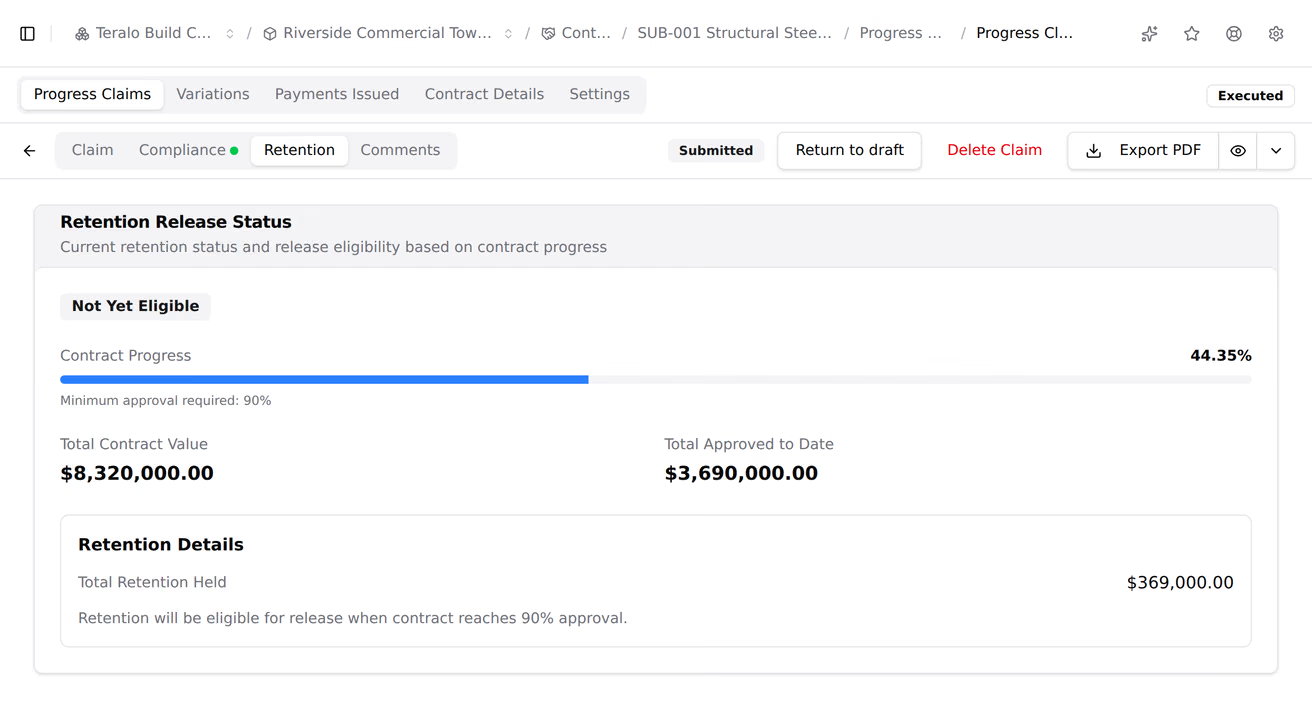
The claim's Retention tab shows the retention held and whether the contract is eligible for release. A contract is eligible once its approved claims reach the Min Approval for Release (%), 90% by default.
- On a draft claim's Retention tab, select Request Initial Release (50%), or later Request Balance Release.
- Select Confirm Request.
The retention is released when that claim is approved. The initial release is 50% by default.
Approving a claim certifies the amount; it doesn't record a payment. Host staff record payments on the contract's payments tab. The claim's Payment column then shows Partial or Paid.
On a claim, select Export PDF, or use the menu beside it:
- Progress Claim: the claim itself, to preview or download at any stage.
- Payment Schedule: the amounts certified against the amounts claimed, once the claim is approved. On an approved claim, Export PDF downloads it.
The cover page of the claim PDF prints the contract's Payment Claim Statement. Teralo offers wording for NSW - SOPA 1999, VIC - SOP 2002, QLD - BIF 2017 and NZ - CCA 2002. The statement is fixed when the claim is submitted, so later changes to the defaults don't change it.
On the claim's Comments tab, enter a comment, optionally select Attach Files, and select Post Comment. Select Reply to answer one. Both organisations on the contract see the discussion, and each comment shows its author's organisation.
- Every claim on their organisation's contracts, including claims the host raised for them. On a contract with Restrict visibility on, only its named contacts see its claims.
- The assessed figures, but not the justifications.
- Not the payments tab.
A guest's draft claim is hidden from the host until it is submitted. Guests can't assess, approve, reject or return a claim to draft.
A contract's claim settings are on its Settings tab: the Progress Claim Frequency and Payment Terms (Days), the Retention Configuration, the Payment Claim Statement, the Compliance Requirements and the Progress Claim Workflow.
The defaults they start from are set at organisation level: in the organisation sidebar, under Organisation Settings, select Tools, then Contracts, for Retention Defaults, Tax Rates, Payment Claim Statement, Compliance Documents and Accounting.
| Permission | Allows |
|---|---|
| Can submit progress claims | The contracted organisation creating, filling in, submitting and commenting on claims |
| Can approve progress claims | Approving and rejecting claims on an assigned step, and verifying compliance documents |
| Can delete progress claims | The contracted organisation deleting its draft and submitted claims |
The three are independent: granting one doesn't grant the others. Can approve progress claims is host only. Host staff can create, submit, assess, delete and return claims to draft without these permissions. Learn more about how permissions work.
The progress claim workflow is set on each contract, under Approval Workflows, as its Progress Claim Workflow. Its run starts when a claim is submitted, so a draft has no workflow.
The default templates are Progress claim approval, one review step with Approve and Reject, and Progress claim auto-approve (no review), which approves a claim when it is submitted without the compliance and justification checks.
To act on a step, a reviewer must be assigned to it and hold Can approve progress claims. Learn more about assigning approvers.