Integrations
Connect your accounting software, and reply to mail from your inbox.
Teralo connects to Xero or QuickBooks for accounting, and takes replies to its mail notifications from any email client. This article also covers adding a meeting to your calendar, and your organisation's own calendars.
Only a host organisation can connect accounting software. You need Can view organisation tools to open the page, and Can connect, disconnect and configure accounting software integrations (Xero, MYOB, QuickBooks, Jobpac) to connect. Organisation administrators hold both, unless your agreement leaves accounting integration out. Learn more about plans and entitlements.
- In the organisation sidebar, under Organisation Settings, select Tools.
- Select Contracts. The Accounting tab opens.
- Select Connect Xero or Connect QuickBooks.
- Sign in to Xero or QuickBooks, and allow Teralo access.
Teralo shows the provider with a Connected badge. If you allow access to more than one Xero organisation, Teralo connects the first.
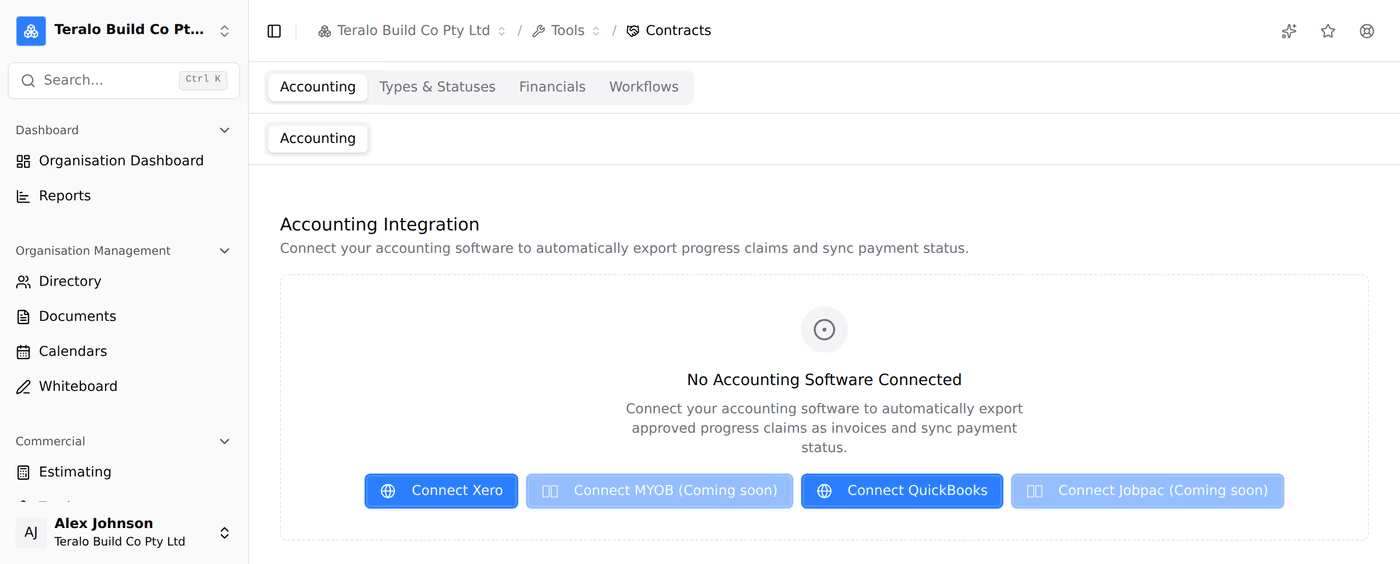
An organisation connects one accounting package at a time. MYOB and Jobpac show Coming soon and can't be connected yet. Teralo keeps the access Xero or QuickBooks grants it, never your password for them.
Under Account Mappings, five tabs line up Teralo with your accounting package. Each tab counts what is still unmapped.
- Budget Codes: the account each budget code posts to, and a Default Expense Account.
- Tax Rates: each tax rate's tax code, set twice: under Purchases (bills / expense contracts) and under Sales (invoices / revenue contracts).
- Revenue: the Default Revenue Account, and for QuickBooks a Default Revenue Item.
- Retention: Retention Payable, Retention Receivable, Input Tax Credit and Output Tax.
- Organisations: the contact in your accounting package for each organisation you work with.
Budget Codes, Tax Rates and Organisations can be filtered to All, Unmapped or Mapped.
A progress claim exports only when its organisation is linked to a contact. Where an organisation's ABN matches a contact, Teralo suggests the match. Select Link to accept it. For QuickBooks, each organisation also has a Customer (revenue) link.
Links belong to your organisation. Two hosts can link the same subcontractor to their own contacts without seeing each other's links.
Under Tax Jurisdiction, choose Tax calculated when paid (the default) or Tax calculated on invoice.
- Progress claims: when the last approval lands, a claim on a cost contract becomes a bill, and a claim on a revenue contract becomes an invoice. Xero receives each bill as a draft. Learn more about progress claims.
- Retention: the bill is net of retention, and Teralo posts the retention as a separate journal once Retention Payable and the Default Expense Account are mapped. With Tax calculated on invoice, the bill carries a negative Retention held line instead.
- Direct costs: a direct cost exports when it moves to a status marked Triggers Accounting Export in the Contracts tool settings. A direct cost type marked Exclude from Accounting Export never exports. The supplier is chosen on each direct cost.
Teralo creates nothing else in your accounting package. It reads your accounts, tax codes and contacts for the mappings, and payments for the claims.
The claim's Accounting card shows its export status:
- Not yet exported: something was missing at approval, such as an unlinked organisation, an unmapped tax rate or no default account. Fix the mapping, then select Push to Xero or Push to QuickBooks.
- Export failed: select Retry export. The claim stays approved.
The Integration Activity panel on the Accounting tab counts Approved Claims, Not Exported, Pending Payment and Paid, and has an Export button on each claim.
Every 15 minutes, Teralo checks Xero or QuickBooks for payments against the claims it exported in the last 180 days. A paid bill shows as paid on the claim.
To check straight away, select Sync payments on the claim's Accounting card, or Sync in Integration Activity.
Reopening an exported claim voids its bill or invoice. If a payment is already applied in your accounting package, Teralo refuses, and offers Force unlock & reopen anyway.
Warning: Disconnecting deletes every organisation link. After you reconnect, link each organisation again.
- On the Accounting tab, select Disconnect.
- Select Disconnect again to confirm.
If the connection expires, the tab shows Reconnect Xero or Reconnect QuickBooks.
The email Teralo sends for a new mail has a Reply by email box. Replying to that email from any email client adds your reply to the thread as a new mail, with its own number and attachments. The person replying doesn't need a Teralo account.
A reply reaches the thread only when:
- it replies to the notification of a new mail. Emails about a status change can't be replied to;
- it comes from the address the notification was sent to;
- the whole email, attachments included, is under 25 MB.
Teralo drops out-of-office and other automatic replies, and removes the quoted email and signature from each reply. A reply that doesn't reach the thread isn't returned to the sender. Learn more about Mail.
On a meeting, select ICS (Download ICS on a phone) to download a calendar file, and open it in Outlook, Google Calendar or another calendar application. Teralo has no calendar feed, and doesn't sync with Outlook or Google Calendar. Learn more about meetings.
Calendars holds dates for your organisation, such as accounts processing cut-offs, company events and public holidays. It sends no reminders or invitations. To open it, in the organisation sidebar, under Organisation Management, select Calendars.
- Select More, then New calendar.
- Enter a Name and, optionally, a Description, and choose a Colour.
- Under Who can see it, choose Everyone, Selected roles (then the permission templates) or Only me.
- Select Create calendar.
Anyone can create a calendar only they can see. A calendar others can see needs Can create, edit and delete organisation calendars and their events.
- Select New entry.
- Choose the Calendar and enter a Title.
- Enter the Start date, and an End date for a range.
- Optionally, turn off All day and enter the times.
- Optionally, choose how it Repeats: Daily, Weekly, Fortnightly, Monthly or Yearly. For weekly and fortnightly, choose the days under Repeat on. Optionally, enter a Repeat until date.
- Select Add entry.
- Select More, then Add public holidays.
- Choose the Calendar and the Region.
- Choose the From year and To year.
- Select Add holidays.
Teralo works out the dates, Easter included. Adding the same years again adds only the holidays that are missing. Holidays that are proclaimed each year are not included.