Contract execution and e-sign
Get a procurement contract signed electronically in Teralo.
Part of Contract Management.
Found in each project. What's the difference?
Only the host builds and sends envelopes; signers need just the link, not an account.
Contract execution sends a procurement package's contract out for electronic signature once its recommendation is approved. Each package has one signing envelope: the contract document, the people who sign or receive a copy, and the fields each signer completes. When the last signer signs, Teralo produces the executed PDF with a certificate of completion.
- In the project sidebar, under Contract Management, select Procurement.
- Open the package, then select the Contract Execution tab.
Until the package's recommendation is approved, the tab shows Contract execution is not available yet and a Go to Recommendation button. There is no separate approval for execution. Learn more about procurement.
Envelopes are prepared on the web. The mobile app shows Signing available on web on this tab.
- On the Contract Execution tab, select Create signing envelope.
- Enter a Title.
- Choose the Routing:
- Sequential - one at a time: each signer receives the document once the signer before them has signed. This is the default.
- Parallel - all at once: every signer receives the document when it is sent.
- Select Create.
The title and routing can't be changed after the envelope is created.
On a new envelope, the Document card offers two ways in:
- Upload PDF: a single PDF of up to 25 MB.
- Assemble from package: PDFs from the package, merged into one in the order you set.
To assemble the document:
- Select Assemble from package.
- Tick each document to include. The list holds the package's scope revisions, its uploaded files and its linked register documents, up to 20 PDFs and 15 MB in all.
- Under Bundle order, use the arrows beside each document to move it earlier or later.
- Select Assemble.
Once the envelope has a document, Replace uploads a different PDF and Assemble rebuilds the bundle. Either one deletes every field already placed.
- Under Recipients, select Add.
- Optionally, use Find a person to fill in someone on the project or in your organisation.
- Enter the Name and Email.
- Leave Signer on for someone who signs. Turn it off for someone who receives a copy only, marked CC.
- For a signer, choose an Identity check:
- None - the link alone
- SMS code to their phone, which needs a Phone number
- Email code to their address
- Access code you set: enter an Access code of at least 4 characters and give it to the signer yourself.
- Select Add.
Nobody needs a Teralo account to sign or to receive a copy. Under sequential routing, signers sign in the order they were added. To edit or remove a recipient before sending, use the three-dot menu on their row.
A code sent by SMS or email has 6 digits and works for 10 minutes. An access code is at least 4 characters, isn't case-sensitive, and can't be viewed once saved. Once a signer clears their identity check, it lasts 4 hours.
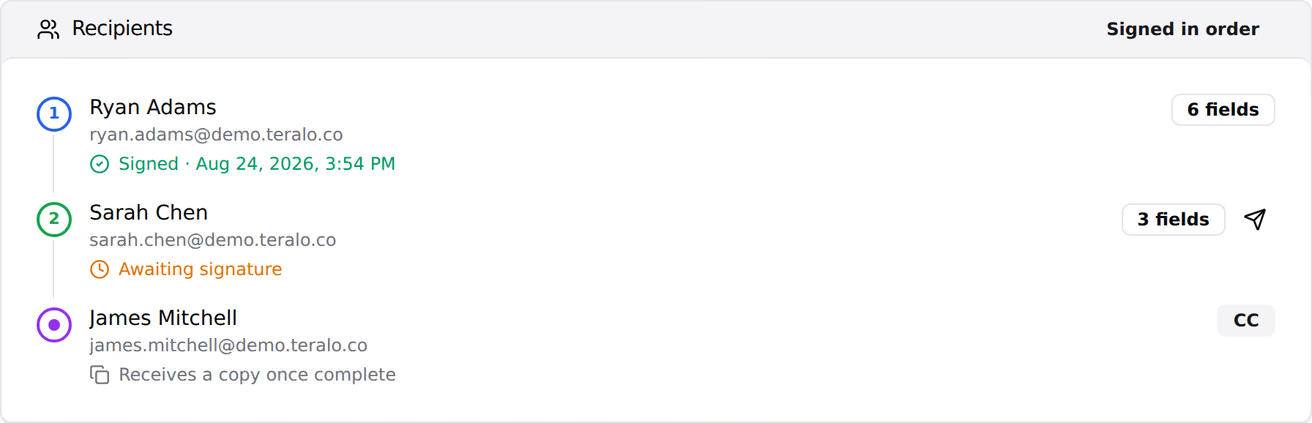

- Under Place fields, choose a Field type and the Signer it belongs to.
- Select the spot on the page.
- Optionally, under Apply to, choose This page only, This page onwards, Every page or Custom range… to repeat the field.
- Select Save layout.
The field types are:
- Signature and Initials: the signer adopts each once, and Teralo applies it to every field of theirs.
- Name: filled in with the signer's name, which they can change.
- Date Signed: filled in with the day they sign, which they can change.
- Text and Checkbox: optional for the signer.
Signature, Initials, Name and Date Signed are required. To delete a field, select it, then select Delete.
- Chase outstanding signers automatically is on by default. Teralo emails a reminder 3 days after a signer's turn starts, then every 3 days, up to 3 reminders.
- Closes on sets the day the envelope expires, at the end of that day in the project's time zone. Select Clear to remove it.
Both can be changed after the envelope is sent. Whether or not reminders are on, Teralo emails each signer a warning 3 days before their link or the closing date runs out.
Warning: Sending locks the document, the recipients and the field layout.
- Select Send for signing.
- In the confirmation, select Send for signing.
Teralo sends only when the envelope has a document and at least one signer, every signer has at least one field, and any closing date is still ahead.
Each signer receives a Signature requested email with their link. Under parallel routing, every signer receives it on sending. Under sequential routing, the first signer does, and each next signer once the one before has signed. A link works for 30 days from the start of that signer's turn.
Select the paper plane icon beside a signer who hasn't signed or declined. Resending works while the envelope is Sent or Out for signing and its closing date hasn't passed. Teralo resends the same link, or a new 30-day link if the old one has lapsed.
- In the Signature requested email, open the link.
- If the envelope asks you to verify your identity, select Send code to my phone or Email me a code and enter the 6-digit code, or enter the access code. Then select Verify.
- Review the document, then select Complete & sign.
- Select Add signature, draw or type your signature, then select Adopt & sign. Do the same with Add initials if the document has initials fields.
- Complete any other fields, tick the statement agreeing to sign electronically, and select Sign document.
To decline instead, select Decline to sign, optionally enter a reason, then select Confirm decline. Declining ends the envelope, and Teralo emails the person who created it.
Warning: Voiding can't be undone. Teralo emails each recipient who has received the envelope that it has been withdrawn.
- Under Void this envelope, select Void envelope.
- Optionally, enter a Reason (optional, shared with recipients).
- Select Void envelope.
An envelope can be voided while it is Draft, Sent, Out for signing or Declined. Before sending, the recipients and the document can be changed instead.
- Draft: being prepared.
- Sent: sent, and nobody has signed yet.
- Out for signing: at least one signer has signed, and others have not.
- Completed: every signer has signed.
- Declined: a signer declined.
- Voided: voided by the host.
- Expired: the closing date passed before every signer signed.
When the envelope is Completed:
- Teralo flattens the fields into the PDF and adds a Certificate of Completion page. It lists each recipient's name, email, status, time signed, IP address and browser, and the consent statement they agreed to. It also prints the original document's SHA-256 checksum, each assembled document with its pages and checksum, and the audit trail's chain hash.
- Every recipient receives the executed PDF by email.
- The package moves to Executed, its Contract executed milestone is stamped, and it locks. Only Communication can still be changed.
- Executed PDF downloads the signed document.
- Copy to Contract Register opens a new contract filled in from the package: its title, the awarded firm, the awarded amount, the commercial terms and the executed PDF. Nothing is saved until you save the contract. Learn more about contracts.
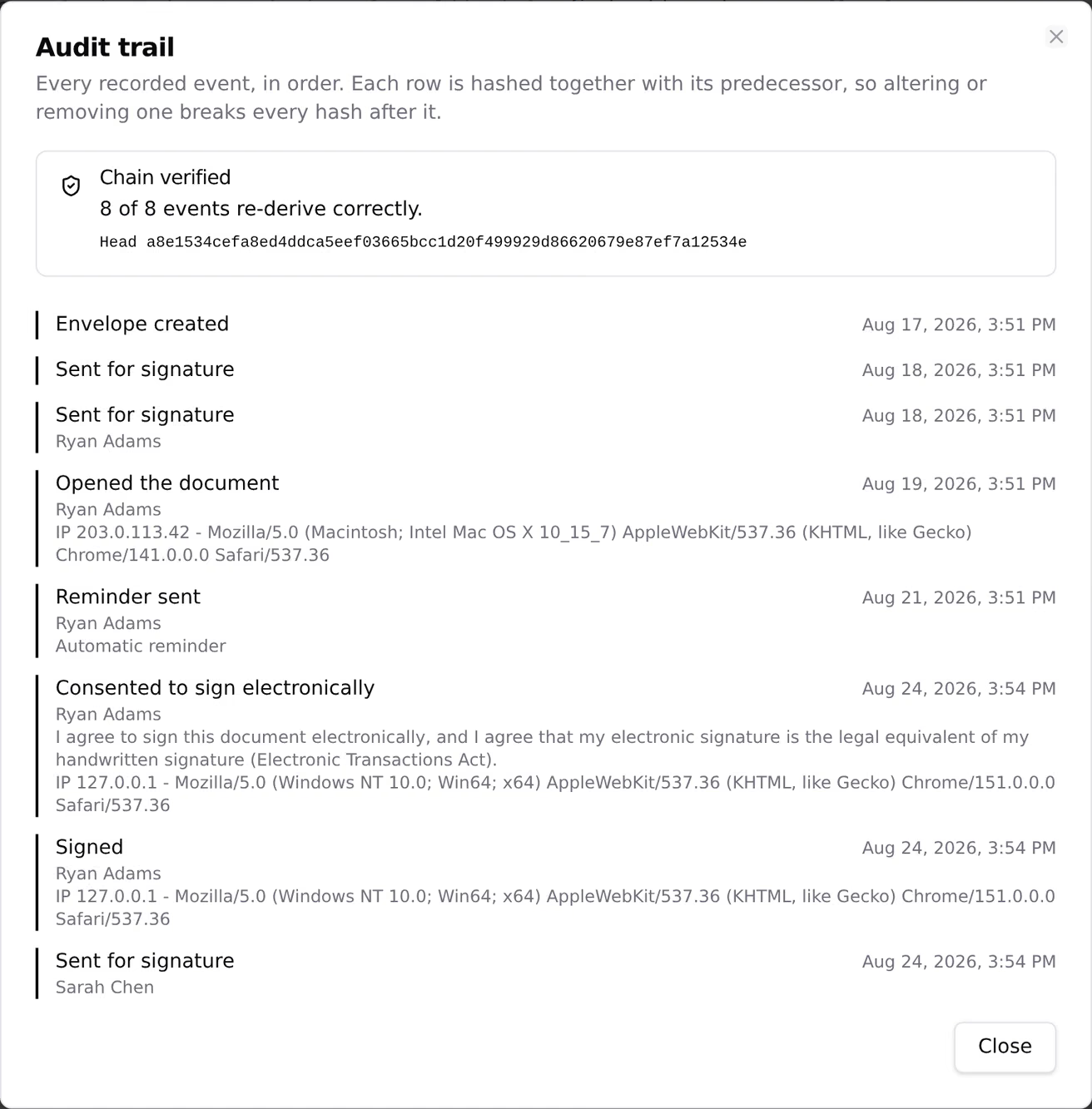
Select Audit trail to see every event on the envelope, such as Sent for signature, Opened the document, Identity verified, Signed and Envelope completed. Each event has its time. Opening the document, verifying, consenting, signing and declining also record the IP address and browser.
The events are hash-chained: each one's hash covers its own details and the hash before it. Opening the trail re-checks the chain and shows Chain verified, or This trail does not verify if any event has changed.
Contract execution has no settings. The approval that opens the tab is the package's recommendation workflow. In the project sidebar, under Project Settings, select Tools, then Procurement, then the Workflows tab.
| Permission | Allows |
|---|---|
| Can view procurement packages | Viewing the envelope, its document and audit trail, and downloading the executed PDF |
| Can edit procurement packages | Creating, preparing, sending, resending and voiding an envelope, and changing its reminders |
Only host staff can use contract execution: a guest granted either permission still can't. Copy to Contract Register also needs Can create contracts. Signing needs no permission and no account. Learn more about how permissions work.