Variations
Raise, price and approve changes to the contract sum.
Part of Contract Management.
Found in each project. What's the difference?
Guests raise variations on their own contracts; only the host approves them.
A variation is a priced change to a contract: added, omitted or changed work. Once approved, it adds to the contract's value, counts in the budget, and can be claimed on the contract's progress claims.
Variations are on each contract's Variations tab. Learn more about contracts.
Each row is one variation, with the columns Variation, Title, Status, Value and Workflow. Variations are numbered VAR-001, VAR-002 and so on for each contract.
A variation's status is Draft, Submitted, Approved or Rejected. Both organisations on the contract see every variation, drafts included.
- On the contract's Variations tab, select New Variation.
- Enter a Title and, optionally, Notes.
- Select Create variation.
The variation opens with one blank line. Its title can't be changed afterwards.
The variation's Schedule of Values card works like the contract's. Each line has a Budget Code, Description, Quantity, Unit, Rate and Tax Rate.
- Use the icons on the card's toolbar to add a section or an item.
- Enter each line's details.
- Select Save.
A line can be negative, for omitted work. Each line's budget code decides where it counts in the budget, so one variation can count against several codes. Lines can be changed in any status except Approved, and a line that has been claimed is locked.
To add notes, enter them on the Notes card and select Save notes. To add files, select Add on the Attachments card.
On the variation, or in its three-dot menu on the register, select Submit for approval. Teralo starts the contract's variation workflow and marks the variation Submitted. A contract with no variation workflow can't have variations submitted.
The reviewer on the current workflow step selects Approve, or Reject with a reason.
With the default workflow, a rejected variation goes to a Revise variation task for the person who submitted it. They can change the variation, then complete the task to resubmit it under the same number.
When a variation is approved:
- it adds to the contract's Total Contract Value on Contract Details;
- on a cost contract, its lines count in the budget's Committed Costs against their budget codes, and on a cost contract whose type is named Head Contract, in Approved HCV's as well;
- it appears in the Variation Works block of the contract's progress claims created after it.
While a variation is Submitted, its lines show in the budget's Pending VAR's column instead.
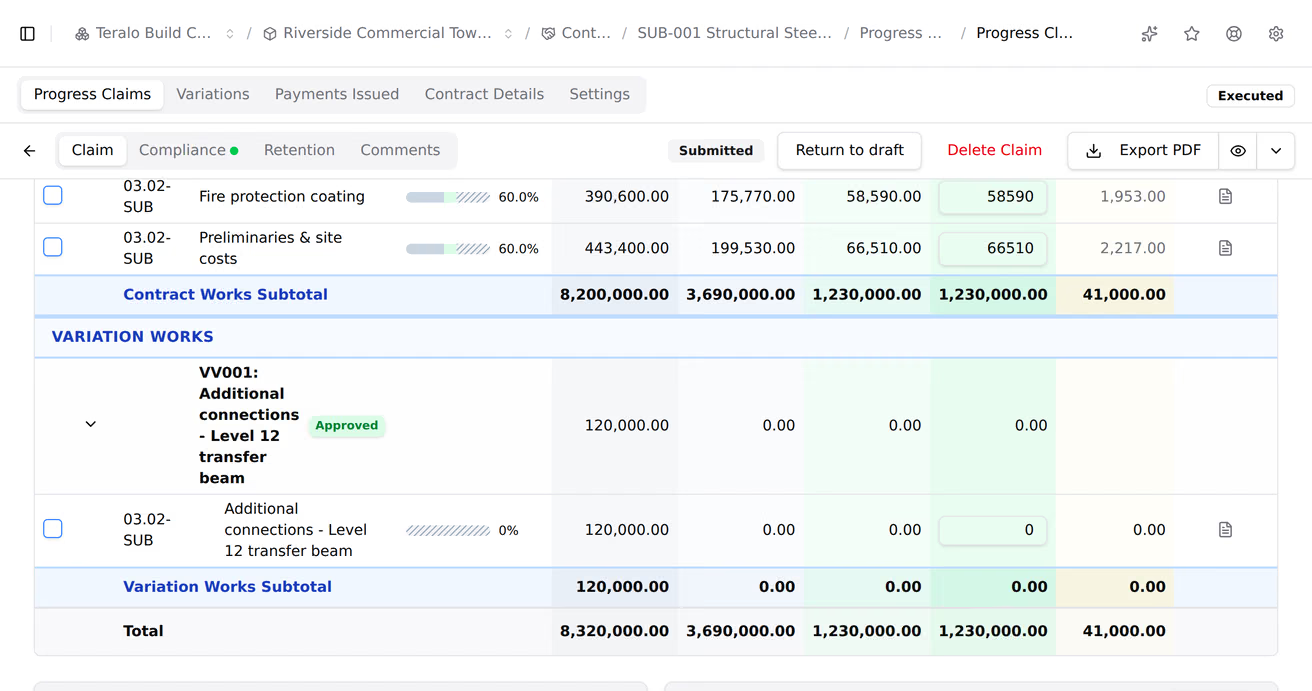
On the contract's Settings tab, under Variation Settings, turn on Allow claiming on unapproved variations. Submitted variations then also appear in the Variation Works block of new claims, and the claim PDF lists them under Unapproved Variations (Submitted).
On a Submitted variation, host staff can select Return to draft. Teralo cancels the workflow run. An approved variation can't be returned to draft.
Warning: Deleting a variation is permanent, and deletes its lines and attachments.
- Select Delete on the variation, or open its three-dot menu on the register and select Delete Variation.
- Confirm the deletion.
Only Draft and Submitted variations can be deleted.
On the variation, select Export PDF to download it, or the eye icon beside it to preview it.
Variation lines have their own retention settings on the contract, under Retention Configuration, then Variation Retention Settings: the Variation Retention Basis, the Variation Rate (%) and its cap. Learn more about retention.
The contracted organisation sees every variation on its contracts, including the host's drafts. With Can submit variations, and while the contract's cross-organisation access is on, its people can create, price, attach files to and submit variations. Guests can't approve, reject or return a variation to draft.
A contract's variation settings are on its Settings tab: the Variation Retention Settings, Allow claiming on unapproved variations, and the Variation Workflow.
The budget codes and tax rates a line can use are set at organisation level and activated on each project.
| Permission | Allows |
|---|---|
| Can submit variations | The contracted organisation creating, pricing and submitting variations |
| Can approve variations | Approving and rejecting variations on an assigned step |
| Can delete variations | The contracted organisation deleting its draft and submitted variations |
The three are independent: granting one doesn't grant the others. Can approve variations is host only. Host staff can create, submit, delete and return variations to draft without these permissions. Learn more about how permissions work.
The variation workflow is set on each contract, under Approval Workflows, as its Variation Workflow. Its run starts when a variation is submitted.
The default templates are Variation approval, one review step with Approve and Reject, and Variation auto-approve (no review), which approves a variation when it is submitted.
To act on a step, a reviewer must be assigned to it and hold Can approve variations. Learn more about assigning approvers.