What is Teralo
Learn what Teralo does and where you fit in.
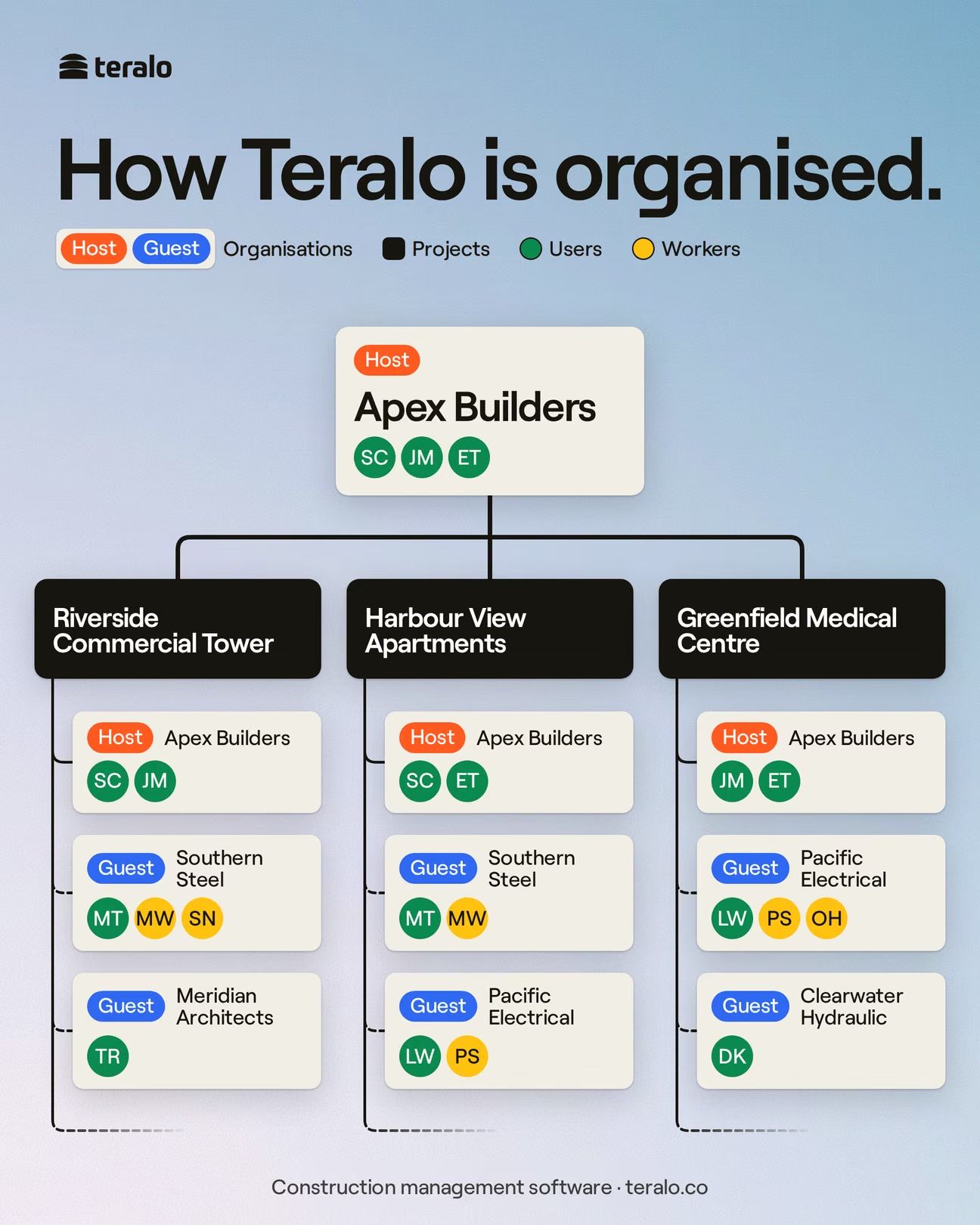
Teralo is project management software for construction. A project in Teralo holds a job's records, such as drawings, mail, inspections, permits, contracts and progress claims, along with the people from every company working on the job.
Every project has a host and guests. The host is the organisation that created the project, and it configures the project's tools, permissions and approvals. Guests are the other organisations working on the project, such as subcontractors, consultants and suppliers. In most tools, a guest sees only its own company's records. Learn more about hosts and guests.
Your organisation is your company's account in Teralo. You belong to it as a member, and you're added to each project separately. Some tools, such as Directory and Permits, exist both in your organisation and on each project. Learn more about organisations and projects and organisation level and project level.
The people on a project are members and workers. A member is a person in an organisation, with a Teralo account. Someone at the host adds each member to the project, from any organisation. Learn more about inviting people to a project.
A worker is a person cleared to work on site by an induction. A worker inducts on the project's public portal, with no Teralo account, and chooses their employer: the host, a guest organisation on the project or a company on the host's employers list. Learn more about inductions.
What you can do on a project is set by your permission template: a named set of permissions, such as Site Team, Subcontractor Manager or View Only. Your template, your organisation's part in the project and the host's plan decide which tools appear in your sidebar. Learn more about how permissions work.
A record that needs someone's agreement goes through a workflow: a set of steps such as reviews, approvals and notifications. A permit is submitted, reviewed and approved. A progress claim is submitted and assessed. Approvals work the same way in every tool. Learn more about how approvals work.
Teralo runs in a browser at app.teralo.co, in a desktop app for Windows, macOS and Linux, and in a mobile app for iOS and Android. You use the same account in each. Learn more about the desktop app and the mobile app.
- If you've been added to a project, start with your first week on a project.
- If you're setting up your organisation, start with setting up your organisation.
- Learn how registers and My Items work. Most tools open on a register.