Documents
Register, revise and issue project documents.
Found in each project and your organisation. What's the difference?
Hosts set it up; each company sees its own documents and those mailed to it.
Documents is a project's register of drawings, specifications, reports and other files. Each document has a number, a revision and a status, and the register shows the current revision of each one.
You see the documents your company authored or uploaded, and the documents mailed to your company. This applies to the host's staff as well as to guests.
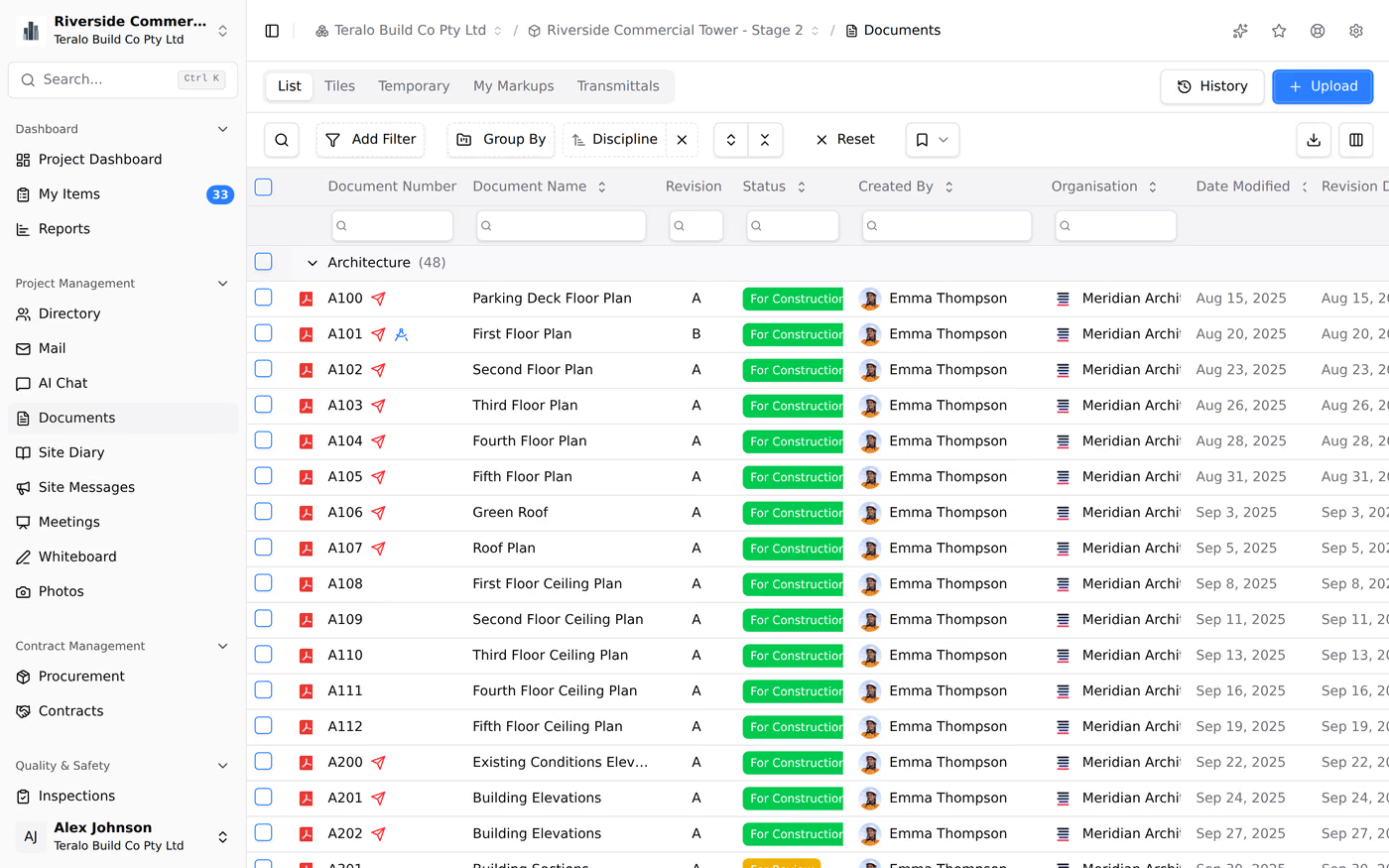
Documents opens on the List tab, a register grouped by Discipline and sorted by Document Number. Its columns are Document Number, Document Name, Revision, Status, Discipline, Location, Created By, Organisation, Date Modified, Revision Date, Type and Size.
The other tabs are Tiles, Folders, Temporary, My Markups and Transmittals.
A red icon on a row means the document hasn't been sent in Mail yet, so people outside your organisation may not see it.
The register's search matches the name, file name, number, status, author and organisation. To search the text inside documents, use the search at the top of Teralo (Ctrl+K, or ⌘K on a Mac).
- In the sidebar, select Documents, then Upload.
- Drag files onto the page, or browse for them.
- Select a file, fill in its Document Details, then select Save Changes. Repeat for each file.
- Select Register.
Each file needs a Doc Number, and the numbers in one upload must differ. The other details are Revision, Revision Date, Author Organisation, Title, Type, Status, Discipline, Location and Notes.
The badge beside Doc Number shows what registering will do:
- New: no document has this number yet.
- Rev and a revision, or Existing: a document already has this number, and the file will become its new current revision. The badge shows the existing document's revision.
- Duplicate: another file in this upload has the same number. Change one of them before registering.
To fill in details from the files themselves, select AI Autocomplete. When you upload a multi-page PDF, Teralo asks whether to Keep as Combined PDFs, Split Only, or Split and Extract Title Blocks, which reads each sheet's title block using one AI credit per sheet.
To register the files later, select Save to Temporary Files in place of Register.
If the project has no document types or statuses yet, Teralo asks you to set them up first.
The Temporary tab holds files that have been uploaded but not registered, including files dropped into a project's _Inbox folder in Teralo Drive. Everyone in your organisation can see your temporary documents. Other organisations can't.
To register them:
- On the Temporary tab, tick the documents.
- Select Register Document.
- Select Register Document(s).
- In the register, select the three-dot menu on the row, then Edit / Supersede.
- Change the details, then select Save Changes.
This edits the details only. To upload a new file, upload a new revision. Learn more about versions and revisions.
To edit several at once, tick them and select the pencil icon, Bulk Edit.
The Folders tab arranges the register by Discipline, then Type. Documents missing either sit in Unclassified, and temporary documents in Temporary. The folders follow the documents' details: you can't create or rearrange them, and a document moves when its discipline or type changes.
Tick documents in the register to show the selection bar. Its icon buttons are View Selected, Bulk Edit, Bulk Supersede, Delete, Mark Obsolete, Public Link, Issue Transmittal, Download as Single PDF and Download as Zip. On a phone, select Actions to see them.

- One document: select the three-dot menu on the row, then Download.
- Several documents: tick them, then select Download as Single PDF or Download as Zip. A single PDF can only combine PDF files.
Warning: Anyone with a public link can download the documents, without signing in, until the link expires.
- Tick the documents.
- Select Public Link.
- Under Link Expiration, choose 7 days or 30 days.
- Select Create Link, then copy the link.
The link opens a Shared Documents page with a Download button for each document and Download All as ZIP.
- Tick the documents.
- Select Issue Transmittal. A new mail opens with the documents attached.
- Complete the mail, then select Send Mail.
Sending a document by mail makes it visible to the recipients' companies. The Transmittals tab lists documents against mail numbers, with the revision sent in each mail. Learn more about Mail.
Marking a document obsolete removes it from the register's current view without deleting it.
- One document: select the three-dot menu on the row, then Mark Obsolete.
- Several documents: tick them, select Mark Obsolete, then Mark as Obsolete.
You can mark documents obsolete when your organisation authored them. To see obsolete documents, select History above the register.
Warning: Deleting a document is permanent, and deletes its file.
- Tick the documents.
- Select Delete, then Delete Document(s).
A document that has been sent in Mail can't be deleted. Deleting needs Can delete project documents.
Select the three-dot menu on a row, then Properties. The page has:
- a Revisions list, with Upload New Revision;
- Open in Viewer;
- the tabs Preview, Properties, Mail References and Submittals.
Learn more about viewers.

Your organisation's own file library, separate from any project, is Drive in the organisation sidebar. Drive is a folder tree you create and nest yourself, with access set per folder.
Document types, statuses and disciplines are set up at organisation level and switched on for each project.
Organisation Settings, then Tools, then Documents, has three tabs: Document Types, Document Statuses and Disciplines. To add one, select the plus icon on the tab. A status also takes a Badge Style, which sets its colour.
The default statuses are Draft, IFR, IFC, AFC, Rejected, For Coordination and For Information.
Project Settings, then Tools, then Documents, has the same tabs. Turn on Activate beside each organisation entry the project uses, or select Activate All. Each tab also has a list of entries for this project only.
| Permission | Allows |
|---|---|
| Can view project documents | Seeing documents |
| Can upload documents to the project | Uploading and registering documents, and editing your organisation's |
| Can edit and register documents their organisation did not upload | Editing and registering other organisations' documents |
| Can delete project documents | Deleting documents |
Downloading, marking up and creating a public link need only access to the document.
Documents doesn't run a workflow. To send documents through a review, use Submittals.