Templates and runs
The organisation owns the shape; the project names the approvers.
A workflow template is a workflow saved in a tool's settings, at organisation level or on a project. A run is one record's pass through a template. Each run belongs to one project.
Templates are kept in each tool's settings, on its Workflows tab. Only the host organisation can open them.
- In the sidebar, under Organisation Settings or Project Settings, select Tools.
- Select the tool, then the Workflows tab.
Contracts splits its tab into Progress Claim Workflows, Execution Workflows and Variation Workflows. Procurement splits it into Recommendation Workflow and Tender Package Workflow.
- The binding card, such as Approval Workflow, on tools that run one workflow for every record. It chooses the workflow the tool runs. Learn more about binding a workflow to a tool.
- The template list: the templates at this level, with Add Workflow.
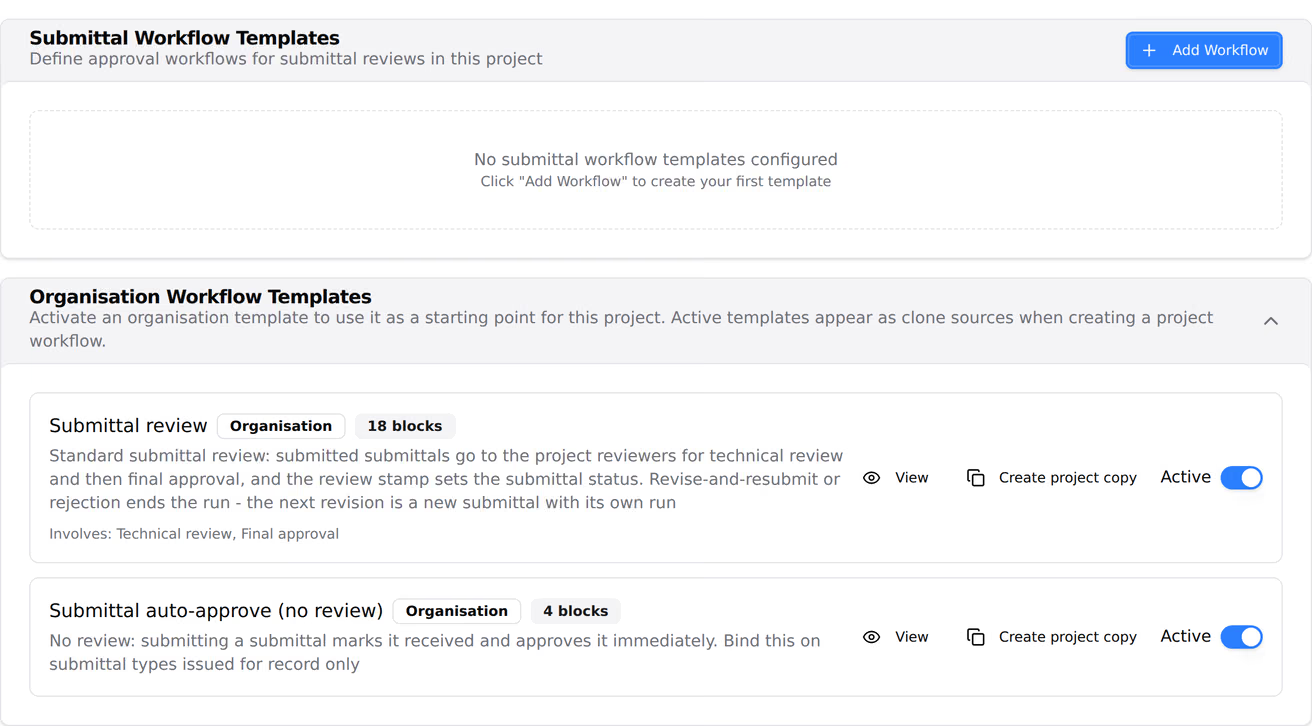
- Organisation Workflow Templates, on a project only: the organisation's templates for this tool, each with an Active switch. The card is hidden when the organisation has none.
- On the tool's Workflows tab, select Add Workflow.
- Build the workflow, then select Create template.
A new template isn't used until it's bound. Learn more about the workflow builder.
Select the pencil icon beside the template. Changes reach new runs only.
Warning: Deleting a template that is bound to a tool unbinds it. New records then run the organisation's default, or can't be submitted until another workflow is bound.
- Select the trash icon beside the template.
- Select Delete.
An organisation template can't name people. On a block set to Specific people, the people are added on each project's copy. Blocks set to Anyone with a permission or From the record find their people on each project as it runs.
A project runs an organisation template in one of three ways:
- It inherits it. A tool with no project binding runs the organisation's bound template, including any later edits to it.
- It chooses it directly. The workflow pickers on a contract, and on submittal, observation, incident and method statement types, list organisation templates beside the project's own.
- It copies it. A project copy is a template of the project's own, made from the organisation template.
- Open the tool's Workflows tab on the project.
- Under Organisation Workflow Templates, turn on the template's Active switch.
- Select the copy icon, Create project copy.
- Add people to any Specific people blocks, then select Create template.
To look at an organisation template before activating it, select the eye icon, View workflow (read-only).
When a project is created, Activate All Templates in its Tool Setup step copies every organisation template into the project at once.
A copy made with Create project copy keeps the organisation template's structure. On the copy, you can change only the people on Specific people blocks. Block names, outcomes, reminders and every other setting stay as the organisation set them.
A copy doesn't change when the organisation template is edited later. To change a copy's structure, edit the organisation template and copy it again, or create a project template.
An organisation created with Create with Defaults starts with a default workflow for every tool, bound and ready to run. One created with Start blank instead has none, and its records can't be submitted until workflows are bound.
Teralo's defaults are copied into an organisation when it's created. Later changes to Teralo's defaults don't reach existing organisations.
A run starts when a record reaches its tool's trigger, usually when it's submitted. Drafts have no run.
A run keeps the blocks, settings and connections its template had when the run started. Editing the template, or binding a different one, changes new runs only.
Every response is kept with the run: the outcome, who chose it, when, and any note. On progress claims, variations, contract execution, procurement, site diary entries, timesheets, inspections and inductions, a record that is reopened and submitted again starts a new run in place of the old one.