How Do Construction Workflows and Approval Chains Work?
Construction workflows and approval chains work by routing documents, requests, and decisions through predefined sequences of reviewers and approvers, ensuring that the right people assess and authorise each action before work proceeds. They replace ad-hoc email chains and verbal approvals with structured, auditable processes that protect project quality, safety, and commercial interests.
Why Workflows Matter in Construction
Construction projects involve thousands of decisions, from approving a drawing revision to authorising a concrete pour to certifying a progress claim. Each decision has consequences: approving the wrong drawing leads to rework; authorising work without proper safety documentation creates liability; certifying an incorrect claim amount impacts cash flow.
Without formal workflows:
- Decisions are made by the wrong people: someone without the authority or expertise approves something they should not
- Steps are skipped: urgent pressure leads to bypassing review stages
- There is no audit trail: when things go wrong, nobody can prove who approved what and when
- Bottlenecks form: everything funnels through one person because there is no defined delegation
Common Construction Workflows
Document Approval Workflow
When a drawing or specification is issued for construction, it typically passes through:
- Author creates or revises the document
- Checker reviews for errors and compliance
- Approver (within the authoring organisation) gives internal sign-off
- Issuer transmits the document to the project team
- Recipient review: the contractor or consultant reviews and provides comments or acceptance
For critical documents, the review may involve parallel review by multiple disciplines (structural, services, facade) before final approval.
Submittal Approval Workflow
When a contractor submits a product data sheet, shop drawing, or material sample:
- Contractor prepares and submits the submittal
- Consultant/designer reviews for compliance with the specification
- Response: approved, approved with comments, or rejected
- If rejected, the contractor revises and resubmits
This cycle may repeat multiple times for complex submittals.
Variation Approval Workflow
When a scope change is identified:
- Initiator raises a variation request with scope description
- Contractor provides a quotation (cost and time impact)
- Consultant assesses the quotation
- Client commercial team reviews and negotiates
- Client authority approves (with value thresholds determining the approval level)
- Variation order is issued and incorporated into the contract
Progress Claim Workflow
Monthly progress claims follow a defined sequence:
- Contractor prepares and submits the claim with supporting documentation
- Superintendent/consultant reviews quantities, rates, and supporting evidence
- Adjustments are communicated and resolved
- Payment certificate is issued with the assessed amount
- Client finance processes payment within the contractual period
Permit to Work Workflow
Permits to work follow a structured approval chain:
- Applicant submits the permit application
- Area supervisor confirms the work can proceed in that location
- Safety officer reviews the hazard assessment and controls
- Permit issuer authorises the work for a defined period
- Close-out after work completion and area reinstatement
Designing Effective Workflows
Keep It Simple
Every step in a workflow adds time and friction. Only include steps that add genuine value:
- A drawing check by the designer's colleague adds value (catching errors)
- A drawing check by four different managers adds bureaucracy (none are likely to review in detail)
Define Authority Levels
Not every decision needs to go to the top. Define threshold-based authorities:
- Variations under $10,000: project manager can approve
- Variations $10,000 - $50,000: construction director approval required
- Variations over $50,000: client board approval required
Allow Parallel Review
Where multiple reviewers need to assess the same item, allow them to review in parallel rather than sequentially. This reduces cycle time significantly. A structural engineer and a mechanical engineer can review a drawing simultaneously.
Set Time Limits
Every step should have a defined response time. If a reviewer does not respond within the timeframe, the item should be escalated or auto-progressed depending on the workflow rules.
Handle Delegation
People go on leave, change roles, or leave the project. Workflows must allow delegation so that a reviewer's absence does not block the entire process.
How Teralo Implements Workflows
Teralo builds workflows into multiple modules across the platform:
Document Workflows
Teralo's Documents module routes documents through approval workflows with sequential or parallel review steps. Each step has configurable reviewers, response options (approve, reject, comment), and time limits. The transmittal matrix shows the distribution and approval status of every document.
Submittal Workflows
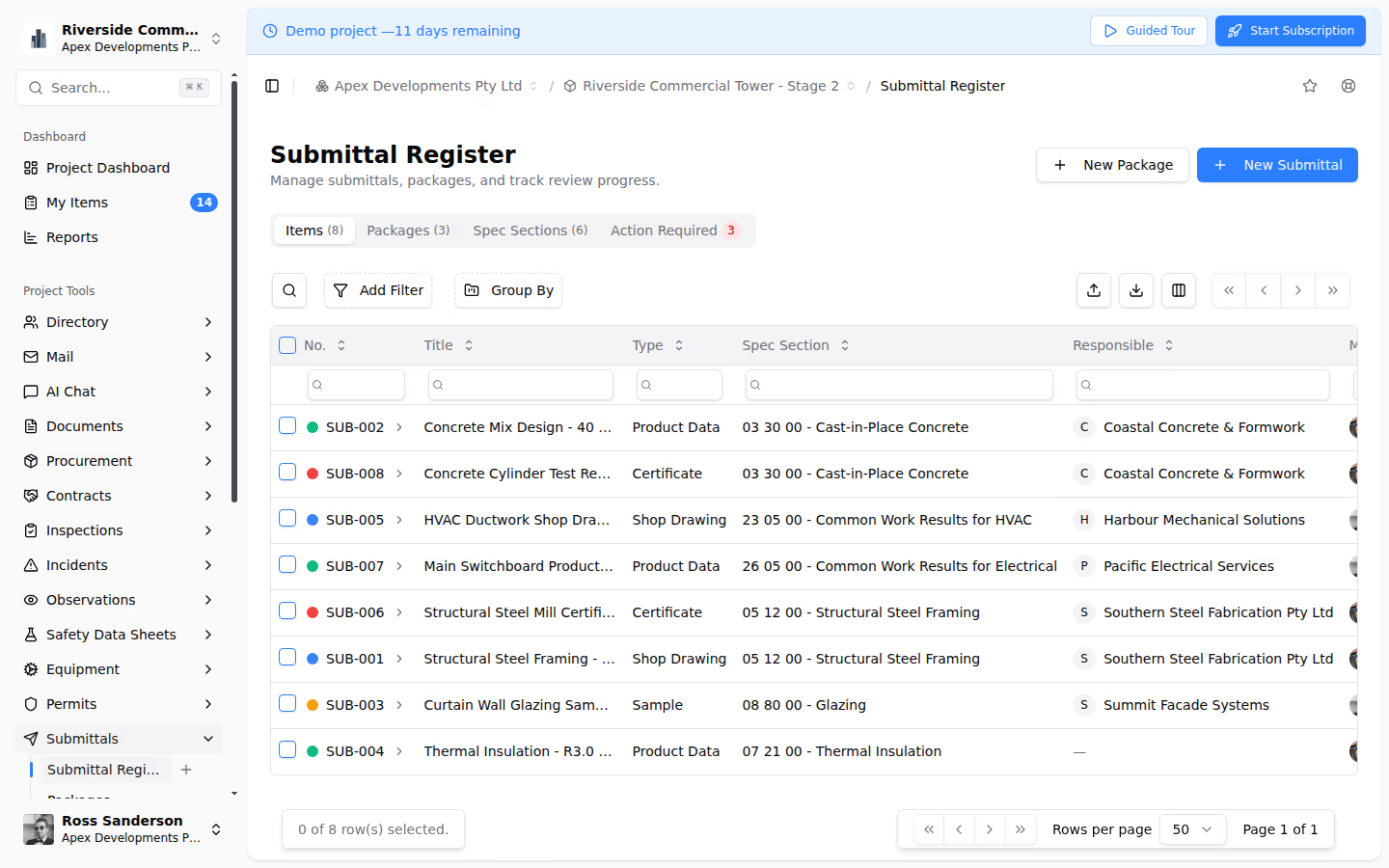
Teralo's Quality module manages submittal packages through multi-step review and approval workflows. Submittals are grouped into packages, and each package tracks its progress through the defined review chain with full audit trail.
Mail and Correspondence Workflows
Teralo's Mail module provides status workflows for each correspondence type. RFIs follow a sequence from draft to sent to responded to closed. Site instructions track from issue to acknowledgement. Status transitions are visible in the register, and overdue items are flagged.
Contract Workflows
Teralo's Contracts module implements multi-step approval workflows for progress claims and variations. Claims route from contractor submission through superintendent assessment to client certification. Variations track from identification through quotation, assessment, and approval.
Permit Workflows
Teralo's Safety module manages permit-to-work workflows with configurable approval chains, validity periods, and close-out requirements.
Best Practices
- Map workflows before configuring them: draw the flowchart on paper first, then configure it in the system
- Involve the users: the people who will use the workflow daily should have input into its design
- Start simple, add complexity later: launch with a straightforward workflow and refine based on experience
- Monitor cycle times: if a workflow consistently takes too long, identify the bottleneck and address it
- Review periodically: workflows designed at the start of a project may not suit its needs six months later
- Train everyone: a workflow only works if everyone understands their role in it
Conclusion
Construction workflows and approval chains bring structure, accountability, and auditability to the thousands of decisions that drive a project forward. A platform like Teralo embeds these workflows across every module, from documents and submittals to contracts and safety, ensuring that nothing falls through the cracks and every decision has a clear audit trail.