How Does Teralo Site Operations Manage Day-to-Day Construction?
Teralo Site Operations manages day-to-day construction through three integrated tools: a digital site diary for recording daily activity, a meetings system with action tracking for capturing and following up on commitments, and a resource booking system for coordinating shared assets. Together, they provide a complete digital record of what happens on site every day.
Why Site Operations Tools Matter
The daily operations of a construction site (what work was done, what resources were used, what decisions were made, what was delayed) form the project's operational history. This history matters for:
- Contractual protection: site diaries are primary evidence in delay claims and disputes
- Accountability: meeting actions track who committed to what and whether they delivered
- Resource efficiency: booking systems prevent conflicts and ensure shared resources are used effectively
- Management visibility: project managers need to know what is happening on site without being physically present every day
When these tools are disconnected or paper-based, information falls through the gaps. A verbal instruction is not recorded. A meeting action is forgotten. A crane booking is double-booked. Teralo solves this by integrating all three into a single site operations platform.
Site Diary
Structured Daily Records
Teralo's site diary provides structured entry types rather than a blank text field:
- Weather: temperature, conditions, wind, and impact on work
- Labour: headcounts by trade, subcontractor attendance, and hours
- Activities: work performed in each area of the project
- Plant and equipment: what was on site, what was in use, breakdowns
- Deliveries: materials received, quantities, and any issues
- Visitors: who attended site, including inspectors and client representatives
- Notes: additional observations, instructions received, delays encountered
Custom columns can be added for project-specific information, ensuring the diary captures exactly what the project needs.
Calendar and List Views
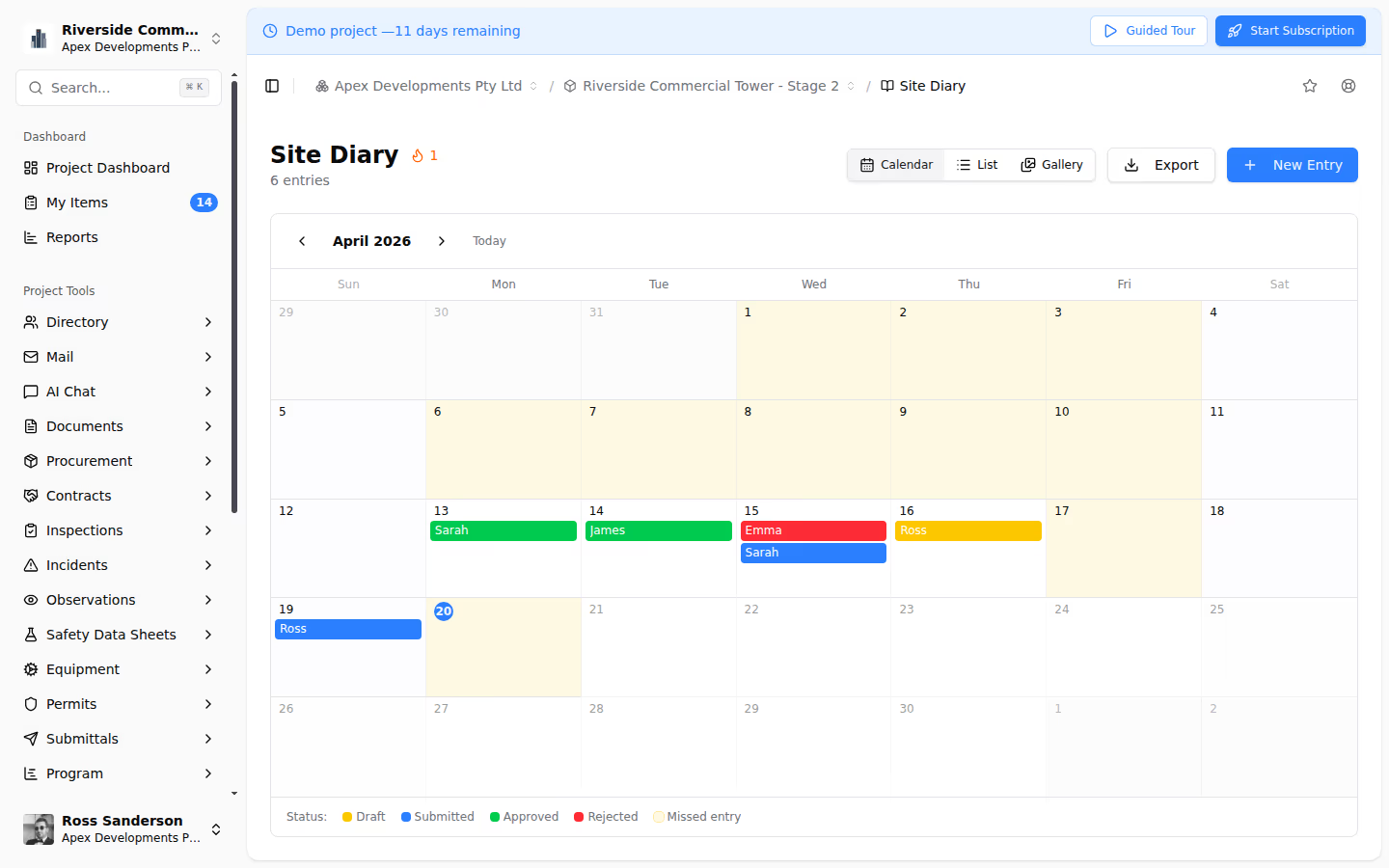
Navigate the diary through a calendar view (click any date to see that day's records) or a list view (scroll chronologically through entries). Finding any day's records takes seconds.
Multi-User Entries
Multiple team members contribute to each day's diary. The site supervisor records activities and weather. The safety officer records inspections and incidents. The project engineer records deliveries and testing. Each person adds their observations, building a comprehensive record no single author could create.
Photo Integration
Photos taken on site attach directly to diary entries, linking visual evidence to the date and context. When the diary records "concrete pour Level 3 Zone A," the attached photos show the work in progress.
Meetings and Action Tracking
Meeting Management
Schedule meetings with date, time, location, and attendees. Define recurring meetings (weekly progress meetings, fortnightly design coordination meetings) so they appear automatically. Maintain agenda templates for each meeting type.
Minutes Capture
Record minutes with structured agenda items, discussion notes, and attendance records. Minutes are created within Teralo and immediately accessible to all participants, with no delay waiting for someone to type up handwritten notes.
Action Item System
The action tracking system is where Teralo's meetings module delivers its real value:
- Every action is a discrete tracked item: not buried in meeting narrative
- Each action has an assignee: single-person accountability
- Each action has a due date: clear deadline for delivery
- Status tracking: open, in progress, completed, overdue
- Carry-forward: uncompleted actions automatically appear in the next meeting's review
- Overdue alerting: automatic notifications when due dates pass
- Filtering: view all actions by assignee, meeting, status, or date
This system ensures that commitments made in meetings are tracked through to completion. The common pattern of discussing the same unresolved issue at meeting after meeting is eliminated because the action register makes non-completion visible and escalatable.
Cross-Meeting Visibility
The action register spans all meeting types on the project. A project manager can see every open action across progress meetings, design meetings, safety meetings, and commercial meetings, identifying overloaded individuals, overdue patterns, and systemic follow-through issues.
Bookings and Scheduling
Resource Booking
Book shared resources (cranes, hoists, pumps, meeting rooms, laydown areas, loading bays) with real-time conflict detection and team-wide visibility.
Three View Types
- Board view: Kanban-style layout grouped by resource, showing bookings as cards. Ideal for seeing utilisation across all resources at a glance.
- Week view: Calendar layout showing bookings across days and resources. Ideal for planning and identifying available windows.
- Register view: Filterable, sortable table of all bookings. Ideal for searching and reporting.
Conflict Detection
When a booking conflicts with an existing reservation, the system alerts the user immediately, before the booking is confirmed. The existing booking details are shown so the user understands the conflict and can find an alternative slot.
Resource Configuration
Configure bookable resources with:
- Availability windows (e.g., crane available 6 AM - 6 PM, Monday to Saturday)
- Capacity limits (e.g., loading bay accepts two simultaneous deliveries)
- Minimum booking durations
- Lead time requirements
Notifications
Automated notifications for booking confirmations, modifications, cancellations, and reminders before upcoming bookings. The entire project team has visibility into the booking schedule.
Integration Between the Three Tools
Teralo's site operations tools are not just co-located; they are integrated:
- Diary + Bookings: bookings automatically appear in the site diary for that day, showing which resources were reserved and by whom
- Diary + Meetings: meeting dates appear in the diary, and meeting actions can reference diary records
- Diary + Safety: inspections, incidents, and observations from the Safety module appear in the diary context for each day
- Meetings + All modules: action items from meetings can reference items in any other module: documents awaiting review, variations under assessment, inspections to be scheduled
Conclusion
Teralo Site Operations provides the three essential tools for day-to-day construction management (site diary, meetings with action tracking, and resource bookings) in a single integrated system. Together, they create a complete, searchable, auditable digital record of everything that happens on site, protecting your project's interests while keeping operations running smoothly.