How Does Teralo Document Management Work for Construction?
Teralo Document Management provides a register-based system where every construction document (drawings, specifications, reports, and records) is numbered, versioned, transmitted through formal workflows, and accessible through a multi-format viewer that handles PDFs, Excel files, and native BIM/IFC models. It replaces folder-based file sharing with the structured document control that construction projects require.
Why Register-Based Management Matters
Construction document management is fundamentally different from file storage. A drawing is not just a file. It has a number, a revision, a status, a discipline, an originator, a distribution list, and a lifecycle. Managing these attributes requires a register, not a folder.
When teams use folder-based tools (SharePoint, Google Drive, Dropbox) for construction documents, they inevitably face:
- Version confusion: multiple copies with unclear revision status
- No formal distribution: documents shared by email without transmittal records
- No status tracking: no way to see which documents are "for construction" versus "for review"
- Search limitations: finding a document means knowing which folder it is in
- No audit trail: no record of who accessed which revision and when
How Teralo Documents Works
Document Register
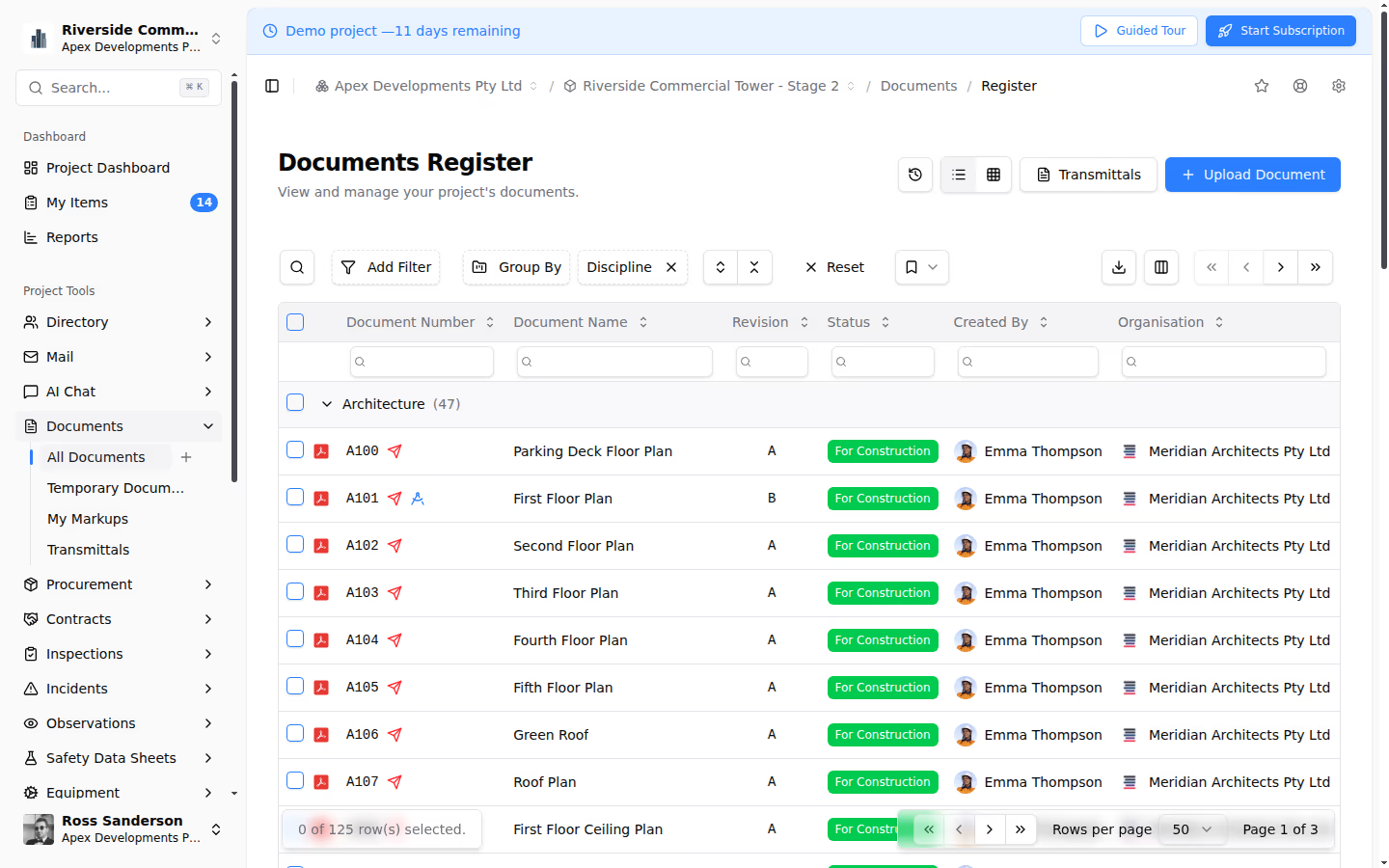
The document register is the heart of the system. Every document has:
- Unique document number: following the project's numbering convention
- Title and description: clearly identifying the document's content
- Discipline: architectural, structural, mechanical, electrical, civil, etc.
- Originator: which organisation produced the document
- Current revision: the latest version with date and status
- Revision history: all previous versions, accessible but clearly marked as superseded
- Status: draft, for review, for construction, as-built, superseded
- Custom metadata: project-specific fields for zone, area, package, or any other classification
The register supports filtering by any metadata field, sorting by multiple columns, and saved filter views for common queries.
Multi-Format Viewer
Teralo's built-in viewer handles the document types that construction projects actually use:
- PDFs: full viewing with zoom, pan, and annotation tools. Annotations include text, shapes, measurements, and freeform markup. Annotations are saved and visible to other team members.
- Excel workbooks: view spreadsheets directly in the browser without requiring Excel. Essential for schedules, cost breakdowns, and data tables.
- BIM/IFC models: native 3D viewing of IFC building models without requiring external BIM software. Navigate the model, select elements, view properties, and understand spatial relationships.
- Split-view comparison: view two revisions of the same document side by side to identify changes. For drawings, this highlights what was modified between revisions, which is critical for reviewing drawing updates.
Transmittals and Distribution
Documents are distributed through formal transmittals that record:
- What documents were transmitted (number, revision, title)
- Who received them (individual recipients or distribution groups)
- The purpose of the transmittal (for information, for review, for construction, for approval)
- The date and time of distribution
- Any covering notes or instructions
Transmittals are linked to the Mail module, creating a correspondence record that proves which documents were issued to which parties and when. This is essential for contractual purposes: if a subcontractor claims they never received a revised drawing, the transmittal record provides definitive evidence.
Approval Workflows
Documents that require review and approval before use (e.g., shop drawings, design submissions, as-built documents) are routed through configurable workflows:
- Sequential review: reviewers assess the document in a defined order (e.g., structural engineer, then architect, then client)
- Parallel review: multiple reviewers assess simultaneously to reduce cycle time (e.g., all disciplines review a coordination drawing at the same time)
- Response options: approve, approve with comments, reject, or request revision, with mandatory comments for rejections
- Time limits: each review step has a defined response period, with notifications for approaching deadlines
- Audit trail: every reviewer action is recorded with date, time, and comments
AI-Powered Search and Categorisation
Managing thousands of documents requires powerful search:
- Metadata search: find documents by number, title, discipline, status, originator, or any custom field
- Full-text search: search within document content, not just metadata
- Semantic search: AI-powered search that understands meaning, so searching for "foundation waterproofing" also finds documents about "substructure membrane" or "basement tanking"
- Auto-categorisation: when documents are uploaded, AI suggests discipline, type, and metadata based on the document content, reducing manual classification effort
Bulk Upload and Staging
Construction document uploads often come in batches, such as a design consultancy issuing 50 revised drawings at once. Teralo handles this with:
- Drag-and-drop upload: upload multiple files simultaneously
- Staging area: uploaded files enter a staging area where metadata can be added, reviewed, and verified before committing to the register
- Batch operations: apply metadata to multiple documents at once
- Duplicate detection: flag files that may duplicate existing register entries
Integration with Other Modules
Mail and Correspondence
Transmittals in the Documents module create corresponding records in Teralo Mail. When a consultant issues revised drawings, the transmittal appears in both the document register and the correspondence register, linking the distribution record to the formal project communication.
Procurement
Tender documentation (drawings, specifications, and scope documents) can be linked to procurement packages. When a tender is issued, the associated documents are automatically included and tracked.
Quality and Submittals
Submittal packages reference documents in the register. When a subcontractor submits a shop drawing for approval, it enters the document register and triggers the submittal workflow in the Quality module.
Safety
Method statements, risk assessments, and safety plans are managed as documents in the register with their own status workflows and distribution requirements.
Conclusion
Teralo Documents provides the structured, register-based document management that construction projects demand, with formal transmittals, approval workflows, multi-format viewing, and AI-powered search. It replaces folder-based file sharing with a system designed for the rigour, auditability, and collaboration that construction document control requires.