What Makes a Good Construction Booking System?
A good construction booking system provides real-time visibility of shared resource availability, prevents double-bookings through conflict detection, supports multiple view types (calendar, board, register), integrates with the broader site operations workflow, and is accessible from any device so field teams can book and check availability on the go.
Why Generic Booking Tools Do Not Work for Construction
Construction teams often attempt to manage resource bookings with generic tools: shared calendars, spreadsheets, or whiteboard schedules. These approaches fail because construction booking has unique requirements:
- Multi-resource coordination: a concrete pour needs a crane slot, a pump, a testing lab, and a delivery window simultaneously
- Shift-based availability: construction resources have operating windows (e.g., crane available 6 AM - 6 PM, Monday to Saturday) that standard calendar tools do not model well
- Field access: the person making the booking may be standing on a scaffold with a phone, not sitting at a desk with a laptop
- Audit requirements: project records need to show who booked what and when, for both operational and contractual purposes
- Integration needs: bookings should feed into the site diary, connect to programme activities, and be visible across the project team
Essential Features of a Construction Booking System
Multiple Resource Types
A construction booking system must handle diverse resource categories:
- Vertical transport: tower cranes, hoists, mobile cranes
- Horizontal transport: forklifts, telehandlers, delivery vehicles
- Concrete operations: pumps, agitators, finishing equipment
- Shared spaces: meeting rooms, lunch rooms, laydown areas, loading bays, car parks
- Utility connections: temporary power points, water supply points
- Testing and inspection slots: concrete testing, weld inspection, survey pick-ups
Each resource type has different availability rules, booking durations, and conflict constraints.
Conflict Detection
The system must prevent double-bookings in real time. When a user attempts to book a resource that is already reserved:
- The conflict should be flagged immediately, before the booking is confirmed
- The system should show the existing booking details so the user understands the conflict
- Alternative available time slots should be suggested
- For resources that can handle limited concurrent bookings (e.g., a loading bay with two docks), the system should track capacity rather than simple availability
Calendar, Board, and Register Views
Different roles need different views:
- Calendar view: shows bookings across time, ideal for planning and spotting gaps or clusters
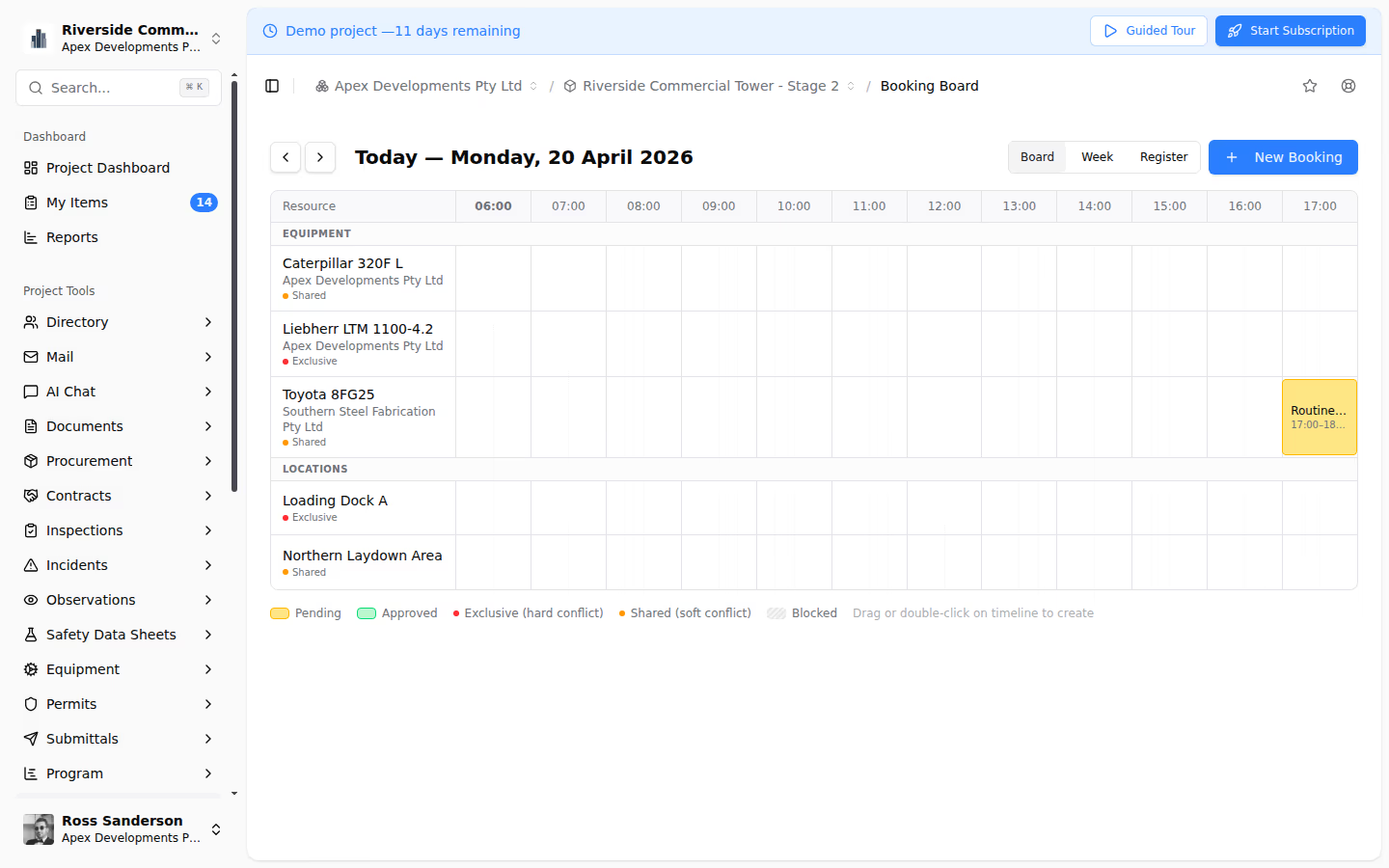
- Board view: shows bookings grouped by resource, ideal for seeing utilisation at a glance
- Register view: a filterable, sortable list of all bookings, ideal for searching and reporting
Users should be able to switch between views depending on their immediate need.
Mobile Access
Construction bookings are often made or checked from the field. The system must work on mobile devices with:
- Easy booking creation from a phone
- Quick availability checking without navigating complex interfaces
- Notification support for booking confirmations, changes, and cancellations
Team-Wide Visibility
Every booking should be visible to the entire project team by default. A subcontractor booking a crane slot needs to see existing bookings from all other subcontractors. The logistics coordinator needs to see all delivery bookings. The site manager needs to see everything.
Notifications
Automated notifications for:
- Booking confirmation
- Booking modification or cancellation
- Reminders before upcoming bookings
- Conflict alerts when someone else books a resource you have an interest in
How Teralo's Booking System Works
Teralo's Site Operations module includes a purpose-built booking system for construction.
Board, Week, and Register Views
Three views provide comprehensive booking visibility. The board view groups bookings by resource in a Kanban-style layout. The week view shows a time-based calendar across all resources. The register view provides a filterable, sortable list for searching and bulk management.
Conflict Detection and Notifications
When a booking is created, Teralo checks for conflicts with existing bookings on the same resource and time window. Conflicting bookings are flagged before confirmation. Notifications alert relevant team members when bookings are created, changed, or cancelled.
Resource Configuration
Project administrators configure the bookable resources, defining types, names, availability windows, and booking rules. Resources can have restricted availability (e.g., crane available weekdays 6 AM - 6 PM only) and capacity limits (e.g., loading bay accepts two simultaneous bookings).
Site Diary Integration
Bookings are linked to the site diary, so daily records automatically show which resources were booked and by whom. This creates a complete operational picture for any given day.
Best Practices
- Book early, confirm close to the date: reserve resources as soon as programme requirements are known, then confirm or release slots 48 hours before
- Enforce minimum lead times: prevent last-minute bookings that disrupt other teams' planning
- Review utilisation weekly: identify underused resources (waste of money) and over-demanded resources (bottlenecks)
- Cancel promptly: release unneeded bookings so other teams can use the resource
- Link to programme activities: connect bookings to master programme tasks so programme changes flag affected bookings
- Make it mandatory: if it is not in the booking system, it is not booked; no informal arrangements
Conclusion
A good construction booking system is purpose-built for the unique demands of site operations: multi-resource coordination, shift-based availability, field access, and integration with the broader project management workflow. A platform like Teralo provides all of these capabilities in a single system that the entire project team can access.